Introduction
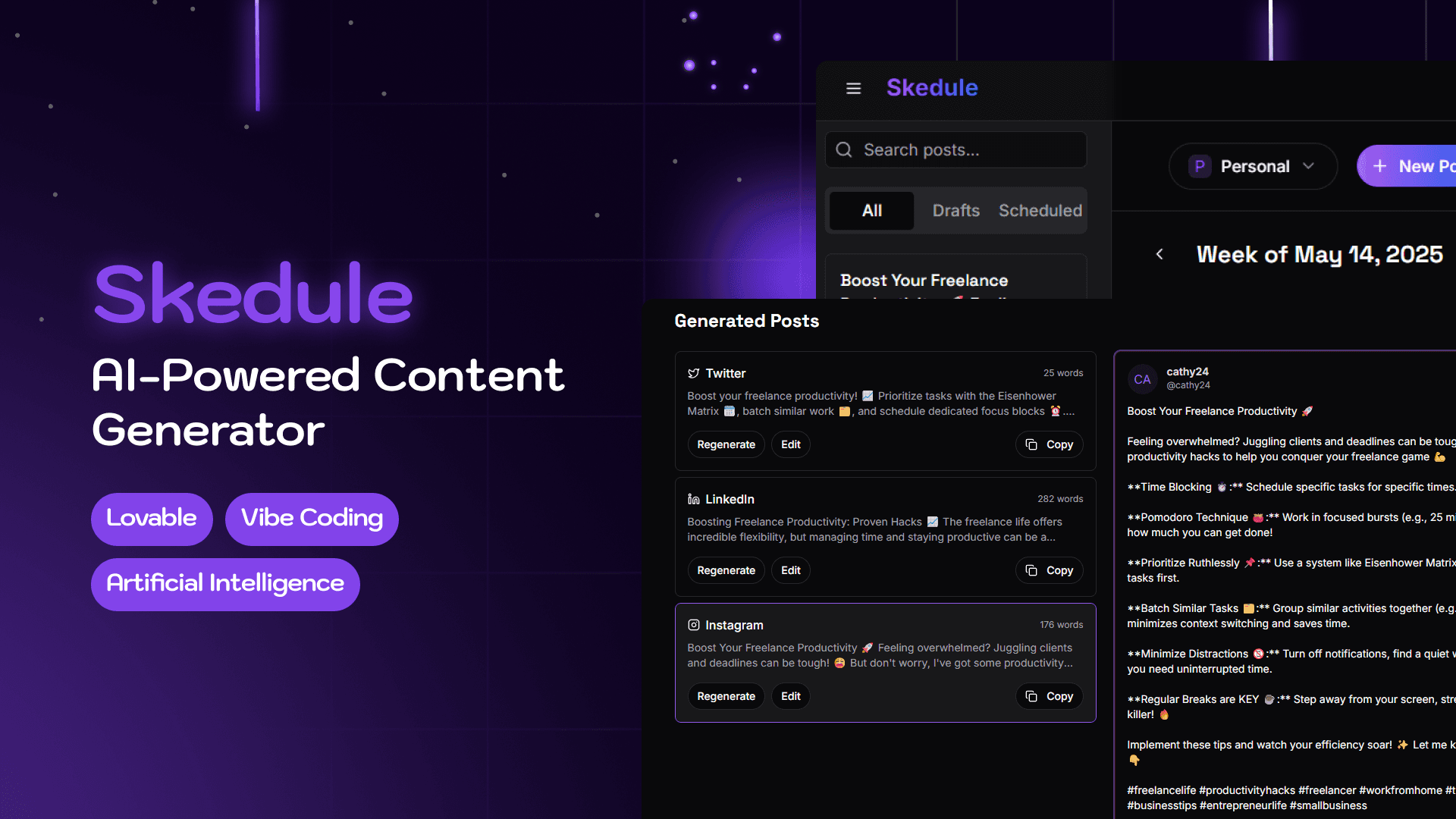
Skedule is an AI-first MVP designed to help solo founders and content creators streamline their social media content creation. Built during a 30-day Supes design challenge, the tool allows users to generate multiple, platform-optimized posts using a single input. With built-in support for workspaces, personalization, and plans for calendar integration, Skedule aims to reduce the friction between ideation and execution.
Watch Demo 📽️
The Problem
Creators and founders often face a common bottleneck:
“I know I should post something… but what? And how do I tailor it for each platform?”
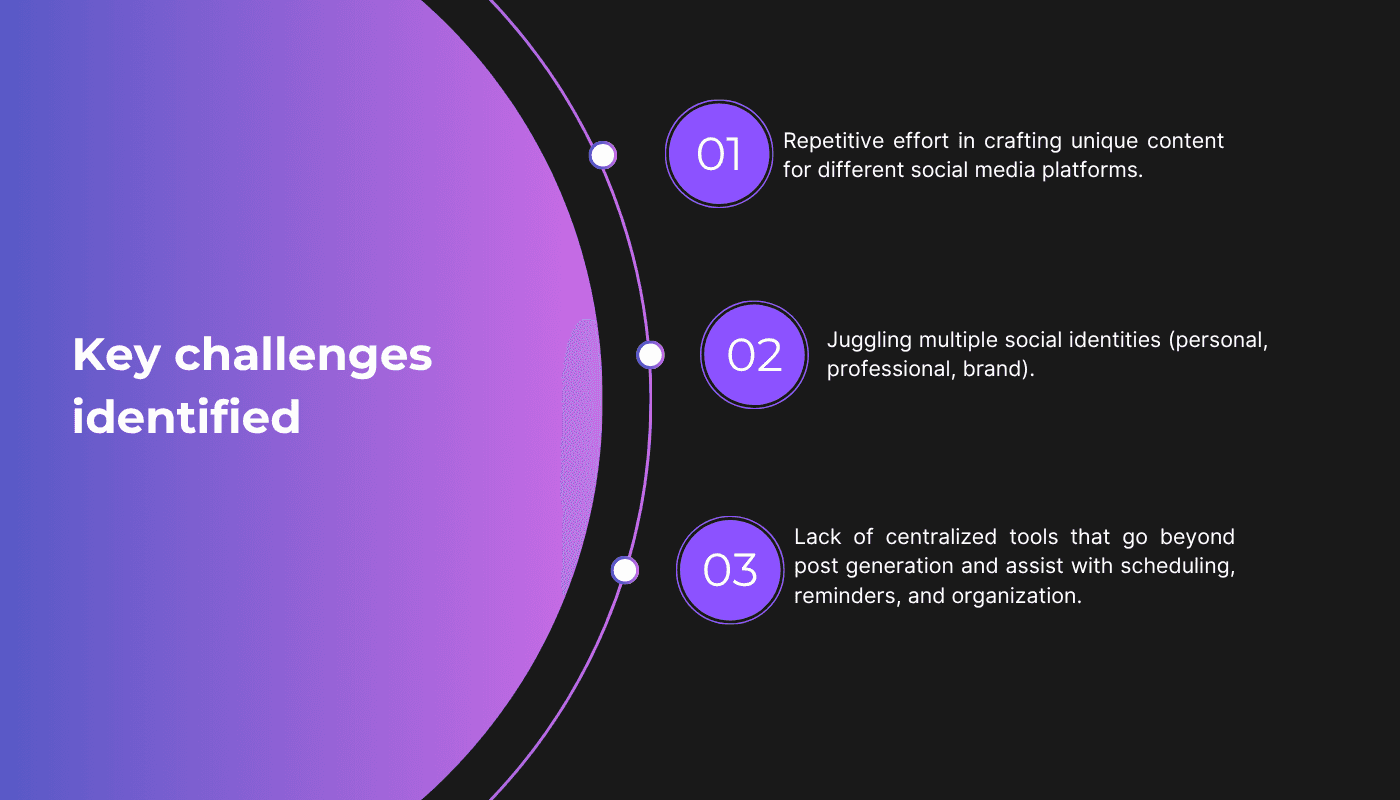
Key challenges identified
The Goal
Design an MVP within 6 days that lets users:
Choose preferred platforms (Twitter, LinkedIn, Instagram)
Input a topic or goal
Set preferred Purpose and Tone.
Optionally include emojis.
Receive multiple AI-generated post ideas tailored per platform
Copy and post instantly with minimal friction
My Role
I acted as the sole UX/UI designer, responsible for:
Defining the flow and interaction model
Designing the UI from onboarding to dashboard
Ensuring the tool felt minimal, modern, and intuitive
Building the product using Lovable.dev, a no-code app builder, inspired by visuals from Dribbble and Pinterest
Competitor & UX Research
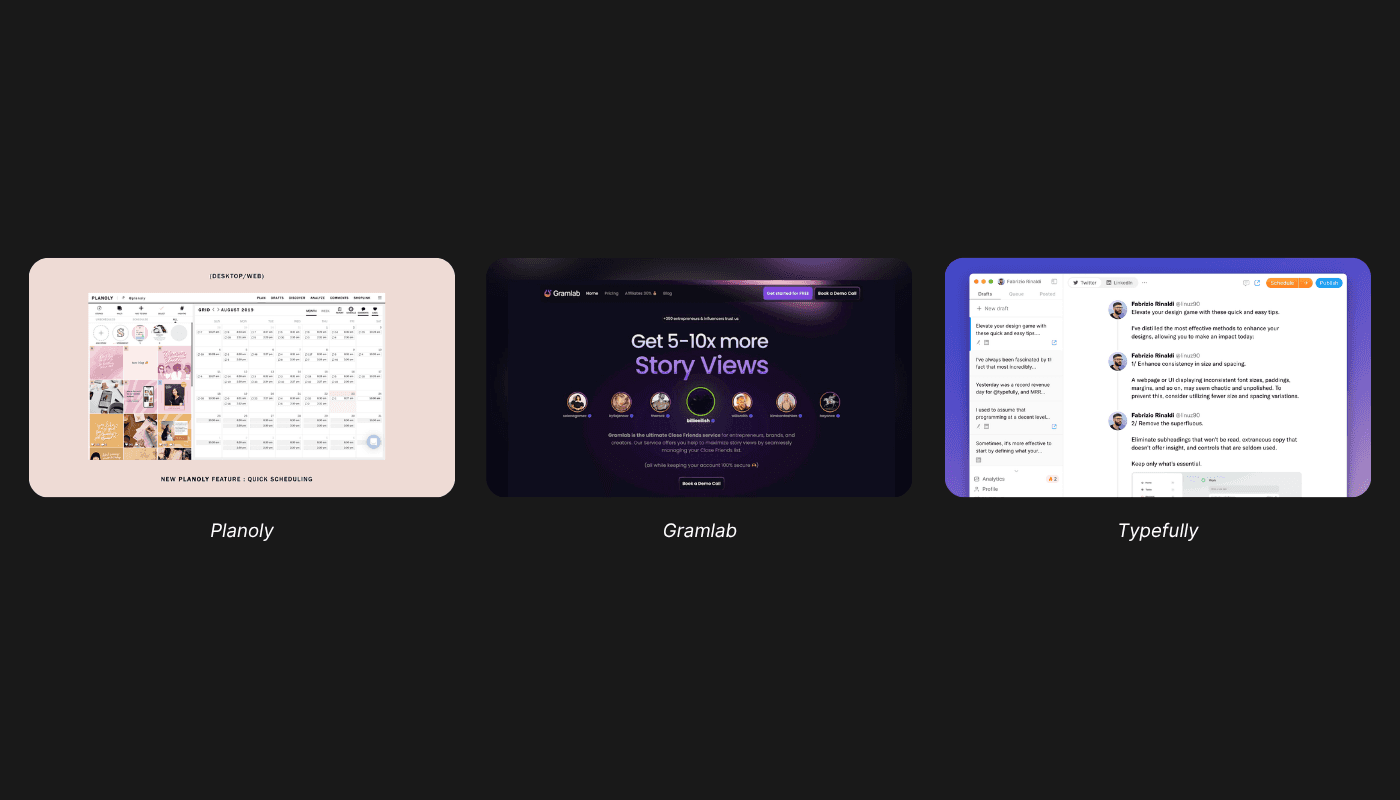
To ground the product in practical UX patterns, I analyzed tools like:
Planoly – For its visual scheduler and Instagram-first approach
Gramlab – For clean interfaces and streamlined post previews
Typefully – For its lightweight UX and Twitter-specific focus
These tools helped identify winning patterns like:
Minimal dashboards
Fast content previewing
Personalization via tone, emoji, and platform-based formatting
User Flow Design
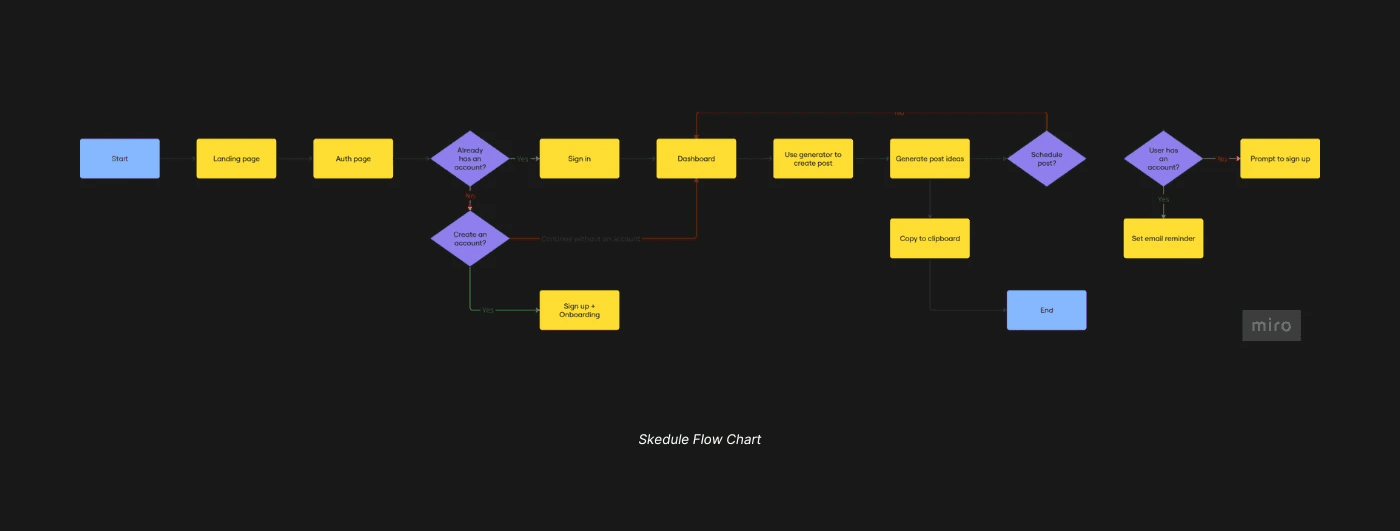
Attached below is the full user flow designed in Miro:
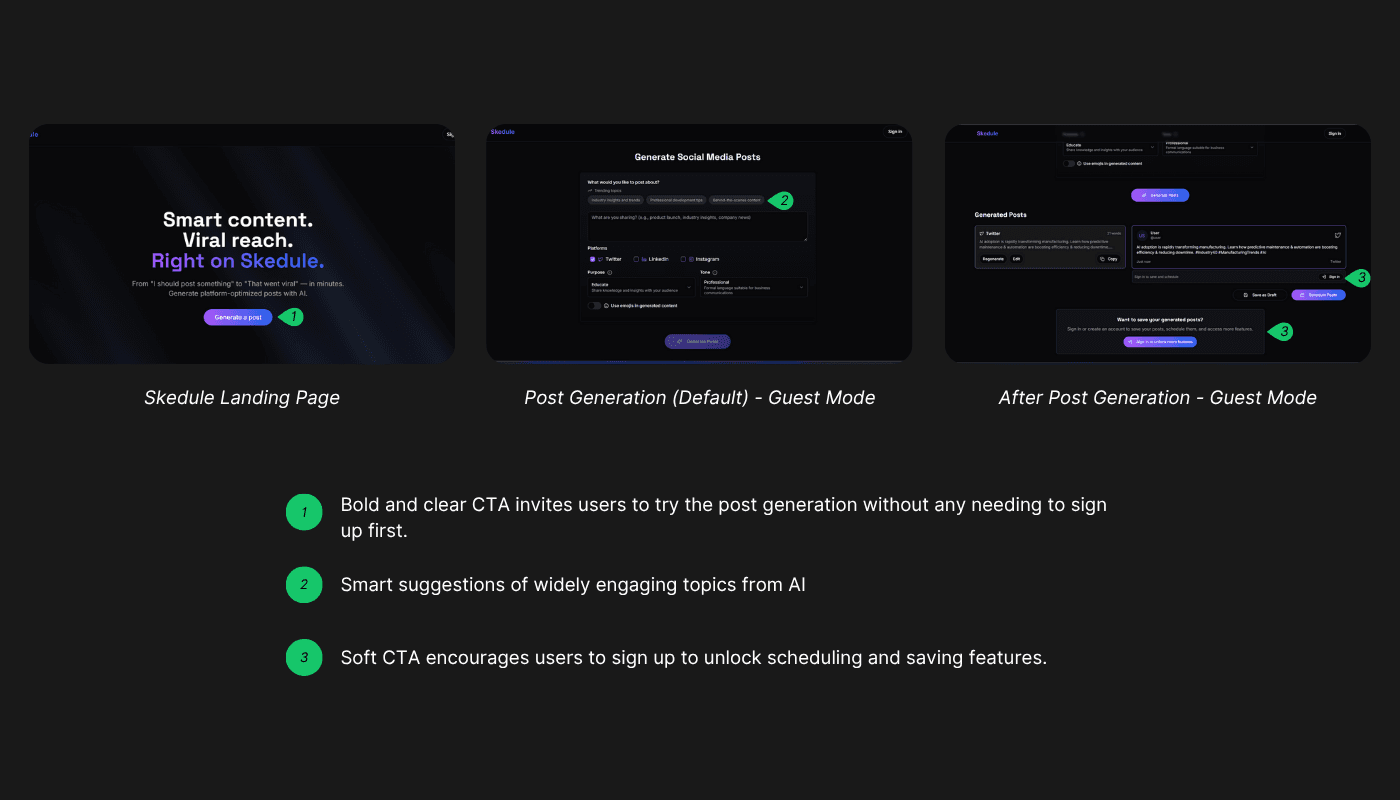
Guest Access — Try Before You Commit
One key design decision I made was to remove barriers to entry by allowing users to try Skedule without creating an account.
Users can enter prompts and generate content instantly.
They can copy the generated content to their clipboard and use it however they wish.
To save or schedule a post, they’ll need to sign up for an account.
💡 Design Insight:
Many users hesitate to commit to a new product. This “try-before-you-commit” model offers immediate value and helps users validate Skedule’s usefulness before deciding to create an account.
It’s a soft conversion strategy: instead of forcing sign-ups upfront, Skedule earns user commitment by showcasing value first.
Onboarding & Personalization
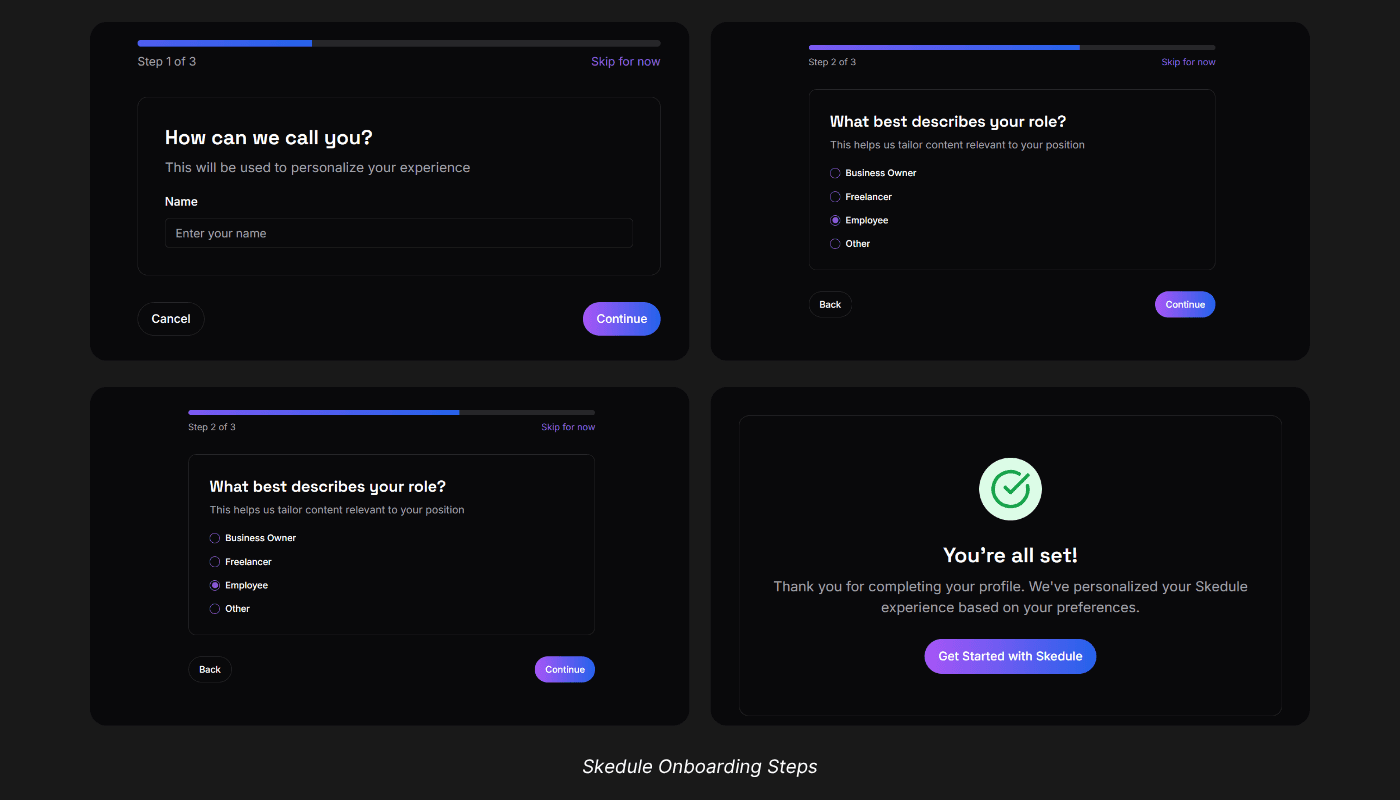
Skedule’s onboarding flow is designed around user goals and content needs — with a focus on collecting just enough context to make the experience feel smart and tailored from the start. It asks:
Name - For a personal touch throughout the platform
Nature of work – Employee, Freelancer, Corporate Worker, Business Owner, Other
Industry - Technology, Marketing, Healthcare, Education, Retail, Other
Creates a Workspace – E.g. Personal vs. Professional accounts
Why “Nature of Work” and “Industry”?
These two inputs serve a deeper purpose beyond categorization — they enable Skedule’s AI agent to offer personalized content suggestions during post creation.
💡 Design Insight:
Users often run out of ideas or feel overwhelmed when creating content consistently. By collecting their work type and industry upfront, the system can proactively suggest relevant topics — reducing cognitive load and helping them stay productive.
For example, a freelance fitness coach in the Health & Wellness space might receive prompts like:
“Top 5 bodyweight exercises for busy professionals” or
“How I manage client check-ins as a solo coach.”
Pre-Post Generation State
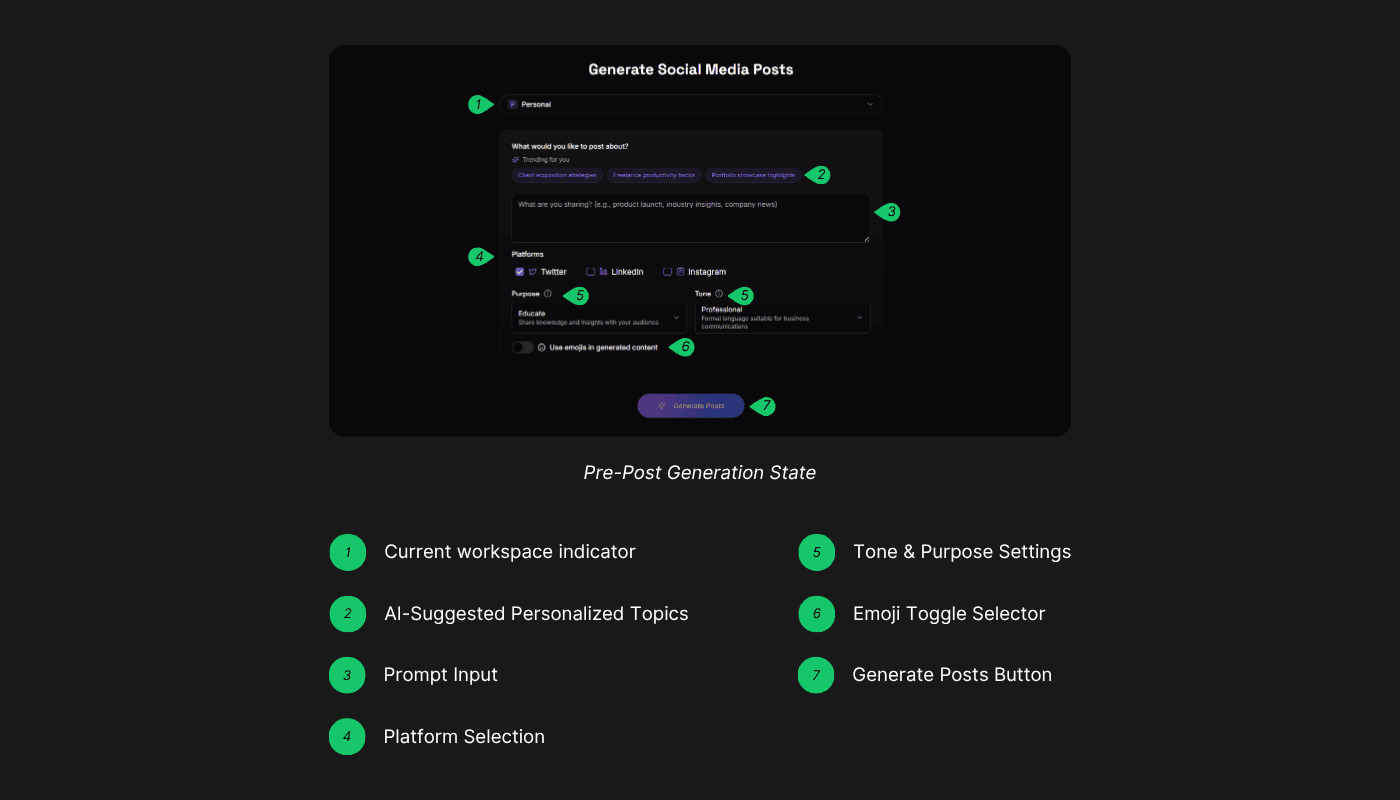
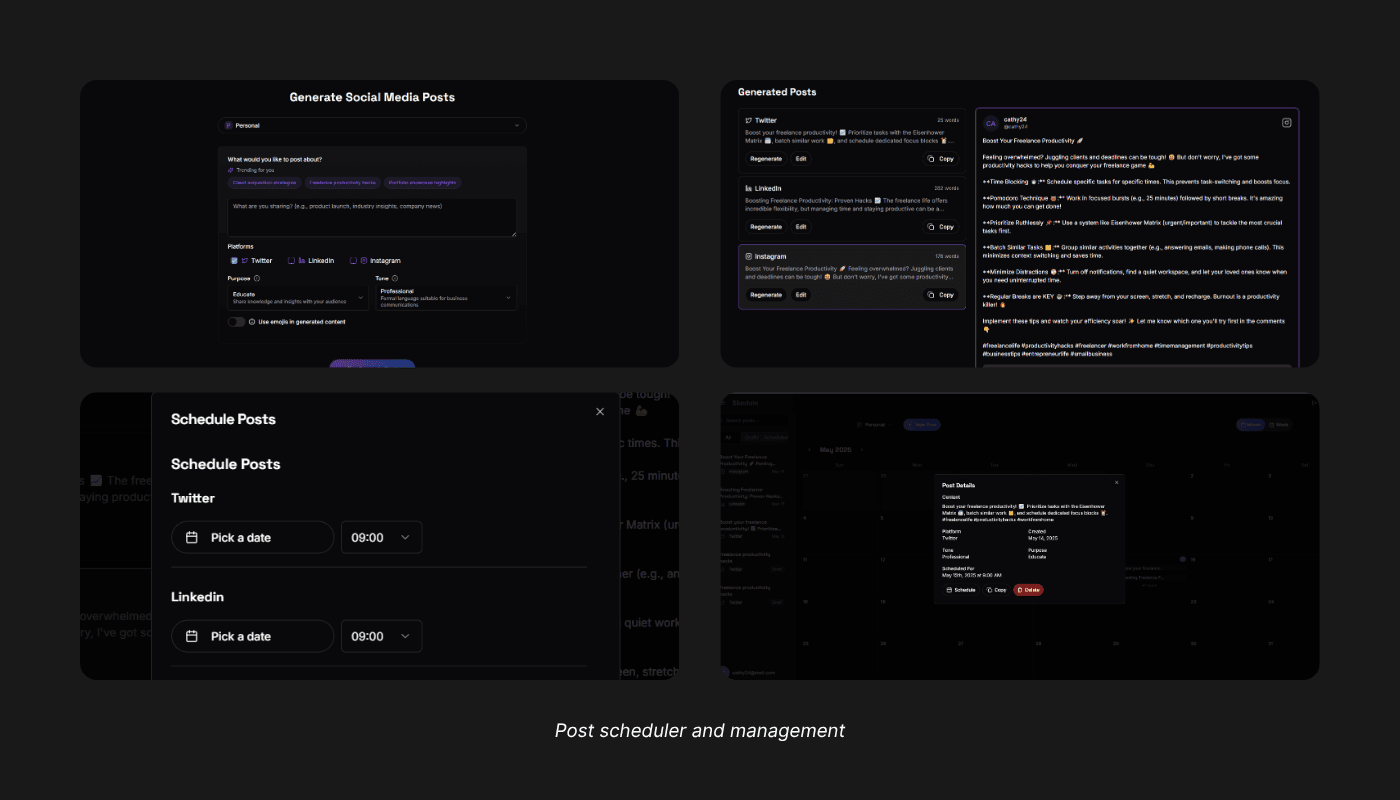
Before generating a post, Skedule empowers users to define what they want to say, where they want to say it, and how they want to say it — making the AI smarter, more relevant, and aligned with their voice.
This stage is designed to feel like a collaborative space between the user and the AI, where personalization, control, and flexibility come together.
Key Features
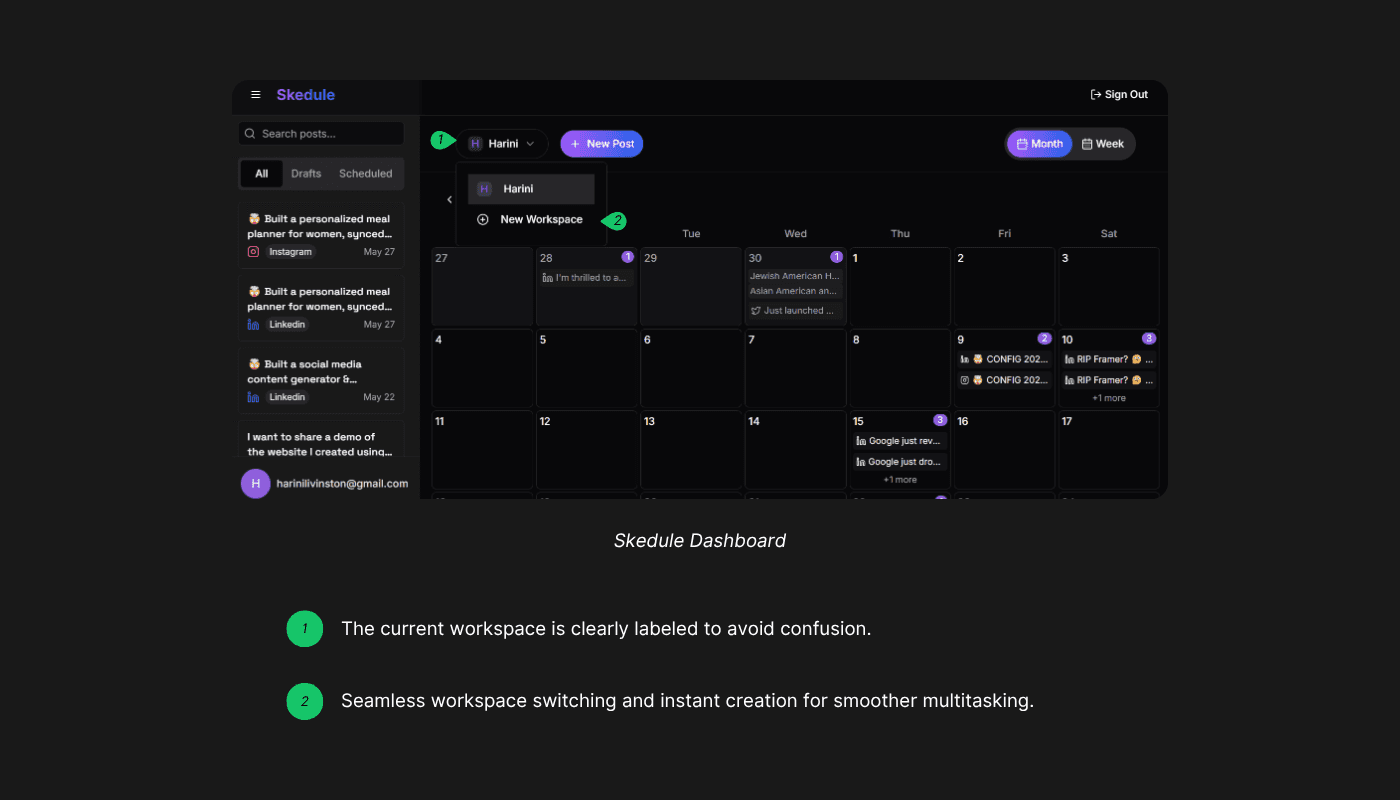
Current Workspace Indicator
The active workspace is clearly shown at the top, reminding users where the content will be saved. This helps them stay organized when managing different brands, projects, or content strategies.
Users can instantly switch between existing workspaces or create a new one with just a click—ensuring flexibility without friction.AI-Suggested Personalized Topics
Using information from onboarding (like industry and nature of work), Skedule suggests content topics tailored to each user’s background. These recommendations help users quickly find inspiration and stay relevant to their audience.
Prompt Input
Users can provide their own prompt or idea to guide the AI toward a specific message— balancing automation with user creativity.
Platform Selection
Users can choose one or more preferred social media platforms (Twitter, LinkedIn, Instagram). The AI then adapts the post to fit the character limits, formatting, and style norms of each selected platform.
Tone & Purpose Settings
Users can define both the tone (e.g., friendly, formal, witty) and purpose (e.g., educate, entertain, promote), ensuring the output aligns with their voice and content goals.
Emoji Toggle & Tone Selector
Subtle tools like an emoji toggle and predefined tone settings give users expressive control over the generated content—making it feel more personal and audience-aware.
Generate Post Button
With preferences set, clicking Generate Posts delivers an AI-crafted post that reflects all selected inputs—personalized, platform-ready, and instantly usable.
Post-Post Generation State
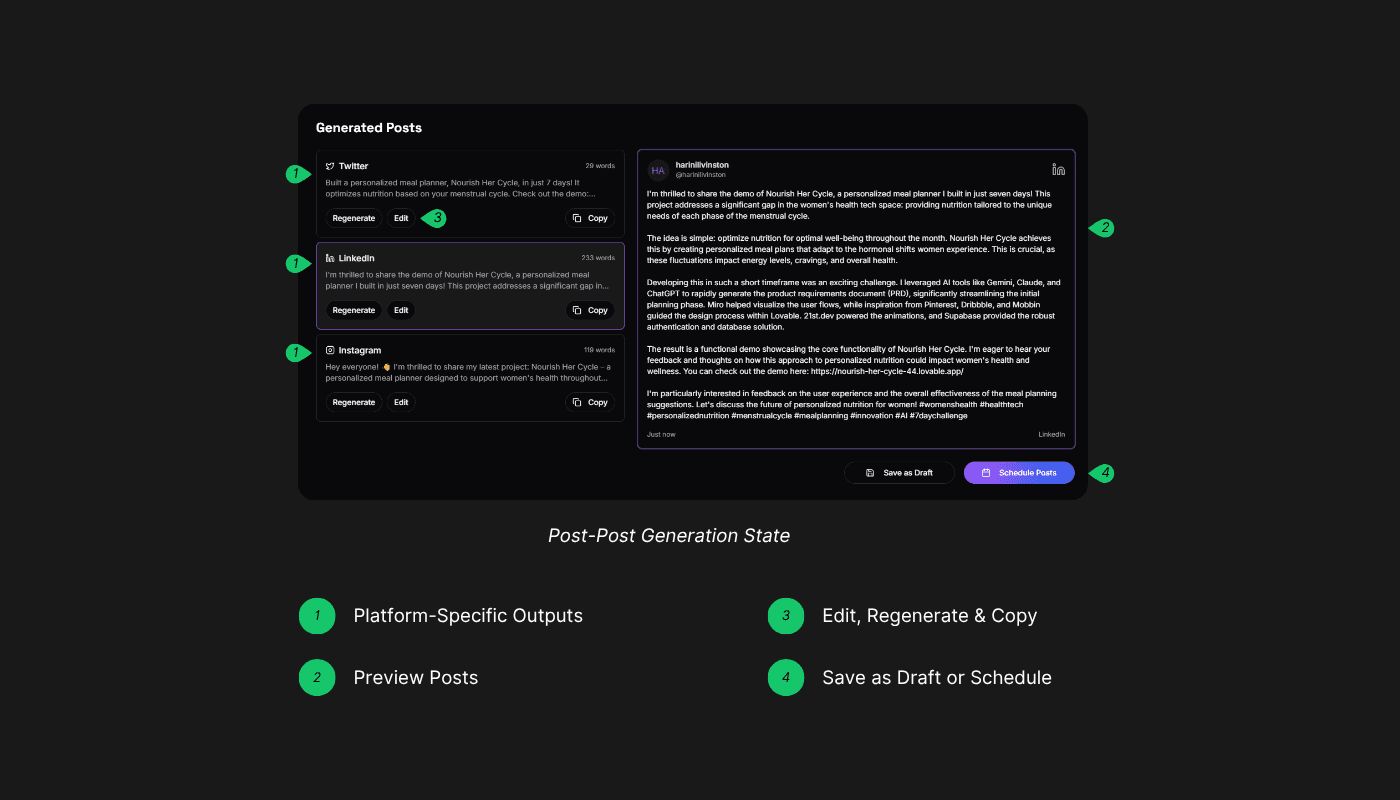
Once a post is generated, Skedule moves into an editing and scheduling phase that gives users complete control over how and when their content goes live. This state is designed to turn AI-generated drafts into finalized, ready-to-publish posts with minimal friction.
Key Features
Platform-Specific Outputs
A unique post is generated for each selected platform (e.g., Twitter, LinkedIn, Instagram), tailored to its format, tone, and limitations.
This ensures that content feels native and effective on every channel.Preview Posts
Users can preview how each post will look per platform before making changes or scheduling. This helps them visualize formatting, tone, and clarity in the intended context.Edit, Regenerate & Copy
If a post needs changes, users can:Edit the content manually to fine-tune the message
Regenerate the post with the same inputs for an alternate version
Copy the content directly to the clipboard for instant use elsewhere
These tools support iteration without requiring a full reset.
Save as Draft or Schedule
Once satisfied, users can either:Save posts as drafts in the current workspace, or
Schedule them using the built-in calendar.
Each post can have a unique publish date and time per platform, offering full scheduling flexibility.
Workspace Organization
All scheduled or saved posts are automatically stored in the selected workspace, keeping content organized by project, brand, or personal account.
This ensures a clear content pipeline and makes it easy to manage multiple strategies within the same platform.
This post-generation flow reinforces Skedule’s mission to simplify content creation—from AI-driven ideation to final scheduling—while keeping users in full control of their voice, platform, and publishing timeline.
The Dashboard - Content Command Center
The Skedule Dashboard serves as the central hub for content planning and management. Each dashboard is tied to a specific workspace, keeping content strategies separated and well-organized—whether users are managing a personal brand or multiple business accounts.
Workspaces = Strategic Separation
Workspaces allow users to separate their content strategies — whether it's a personal brand or a business channel — all within the same platform. This helps streamline content planning without needing multiple accounts.
Key Features
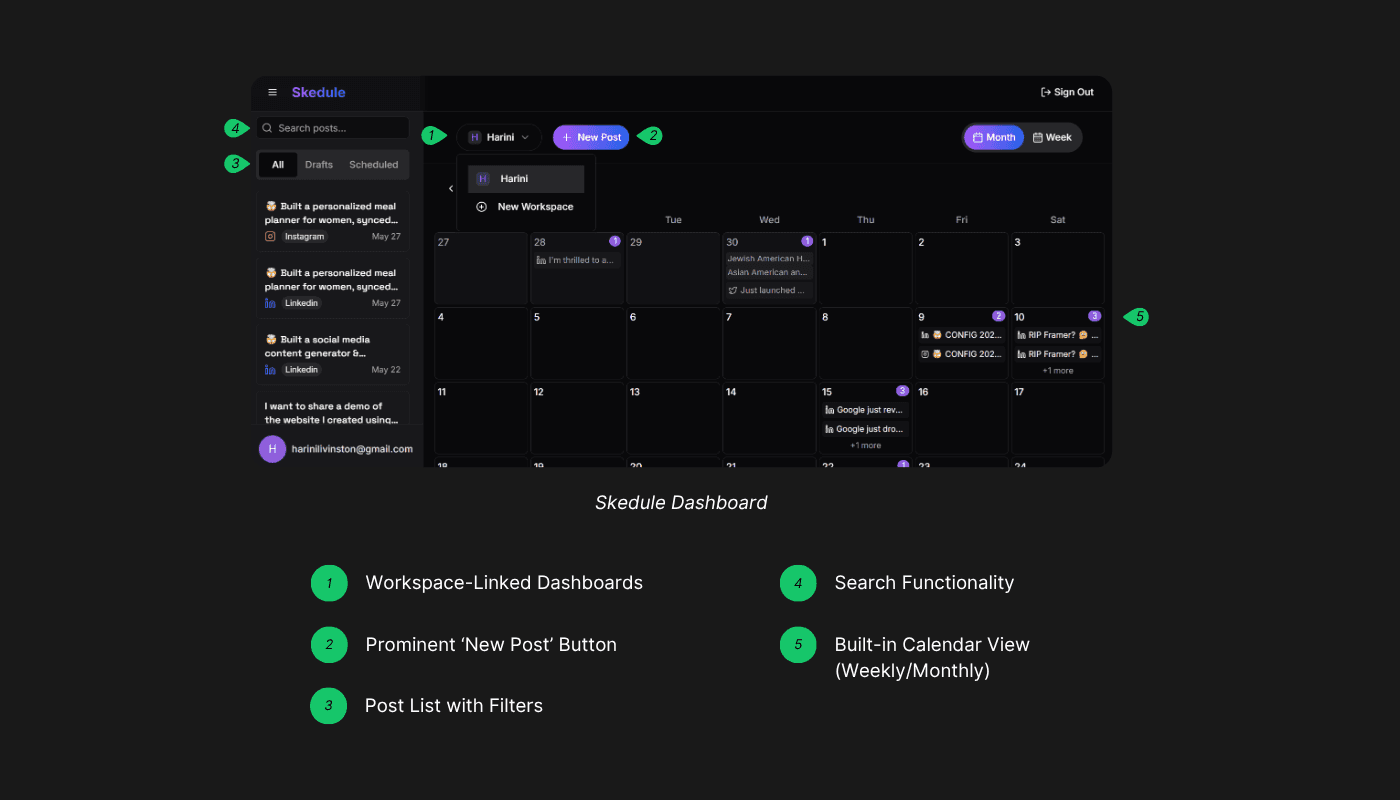
Workspace-Linked Dashboards
Every dashboard reflects the content within a single workspace. This focused structure makes it easy to manage multiple audiences or projects without confusion.
Prominent ‘New Post’ Button
Positioned clearly at the top of the dashboard, the ‘New Post’ button acts as a bold call-to-action—redirecting users to the post generation page and encouraging continuous content creation.Post List with Filters
A left-hand panel shows all posts in the current workspace, organized by tabs:All
Drafts
Scheduled
These filters allow users to quickly sort and find content by status.
Search Functionality
Users can use the search bar to find posts by keyword, making it easy to locate specific content, even in larger libraries.Built-in Calendar View (Weekly/Monthly)
A toggleable calendar lets users switch between weekly and monthly views. The calendar displays:Scheduled posts
Public holidays
Special observance days
This helps creators align content with key dates and maintain a consistent posting rhythm.
Post Details & Quick Actions
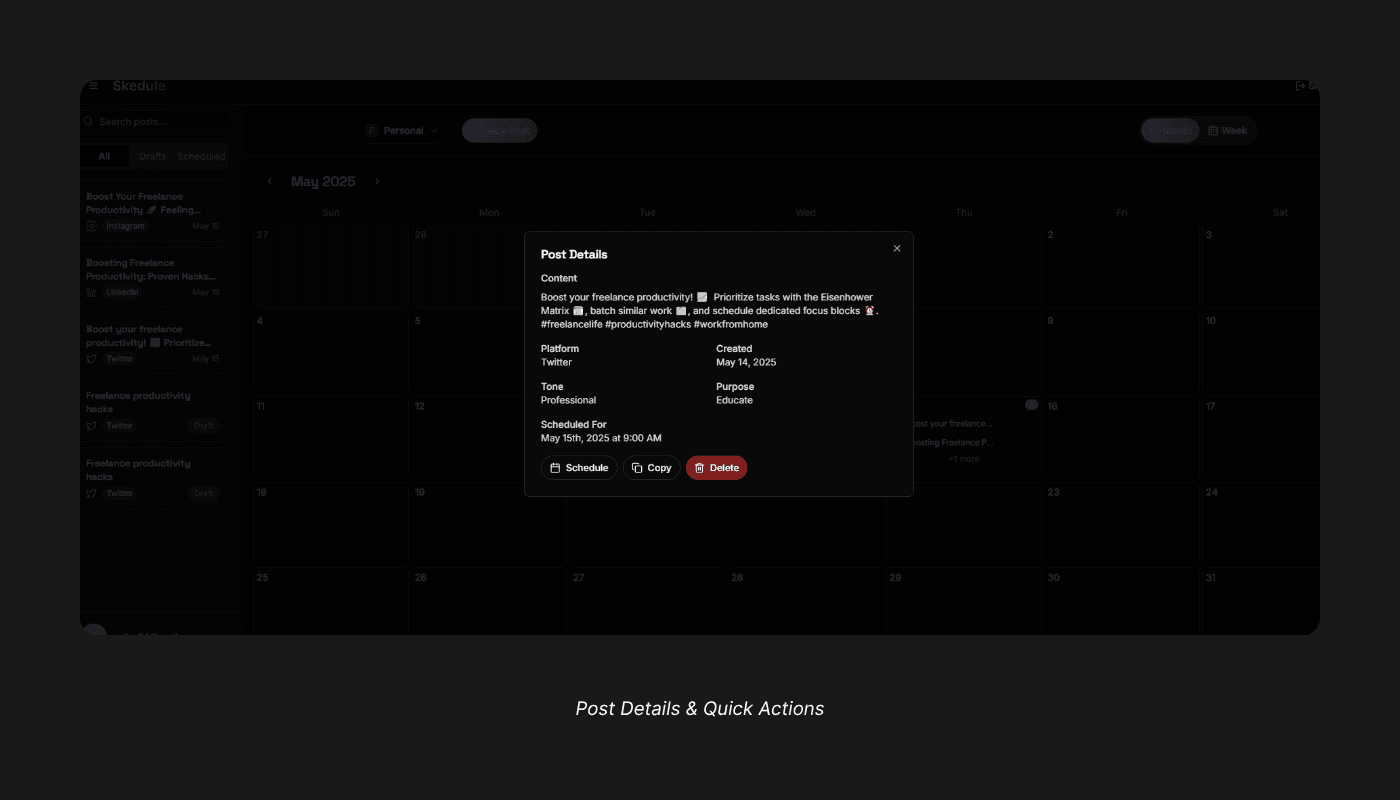
Clicking on a post in the list opens a detailed view where users can:
See the scheduled date and time
Copy the post content
Delete the post
These actions make it simple to manage content with precision.
Testing & Feedback
During the challenge, I shared Skedule with fellow designers, creators, and challenge participants for quick usability testing and feedback. While formal user testing was limited due to the 6-day timeframe, I collected rich insights through informal demos.
Positive Feedback
✅ “Super intuitive UI – I didn’t need any guidance to get started.”
The minimal interface and guided flow helped users navigate smoothly without needing onboarding tutorials.
✅ “Multiple post variations save so much time!”
Users appreciated receiving several AI-generated options at once, tailored to their tone and platform.
✅ “Workspace personalization is genius.”
Segmenting professional and personal content creation resonated well with solopreneurs managing multiple accounts.
✅ “Tone and emoji toggle felt personal and fun.”
Small touches like these enhanced user control and emotional engagement with the tool.
✅ “It feels like having a creative assistant – I love how quickly it delivers.”
The instant content generation experience felt efficient and surprisingly creative to many users.
User Feedback & Areas for Improvement
“I wish I could schedule the post directly from here.”
Users wanted an integrated scheduling feature instead of copying content and pasting it into another platform.
“The tone options are too limited – can I add my own?”
Users asked for more tone variety or the ability to define a custom tone for better brand alignment.“Why can’t I just post directly to Instagram or Twitter from here?”
The absence of direct integration with social media platforms was a common blocker. Users expressed a strong desire for either auto-publishing functionality or calendar-based reminders to be sent via email or push notifications — reducing friction and enhancing the tool’s end-to-end usefulness.
Reflections & Learnings
This project reinforced some powerful product lessons:
🗝️ Less is More
A focused MVP with a clear purpose can deliver significant value—without being feature-heavy.
🗝️ UX over UI
Beautiful visuals matter, but a seamless and intuitive flow makes users return.
🗝️ Solo Doesn’t Mean Slow
With tools like Lovable.dev, it’s possible to build, iterate, and test fast—even as a solo designer.
What’s Next
Integrate Google Calendar to set email reminders for scheduled posts
Build in analytics dashboard for engagement tracking
Enable team collaboration for managing brand accounts
Add light analytics to track post performance
Improve brand voice personalization using keywords and tone presets
Conclusion
Skedule isn’t just a post generator—it’s a co-pilot for creators and solopreneurs aiming for consistency and speed. From idea to publish-ready content in under 5 minutes, it empowers users with AI-driven structure and strategy.