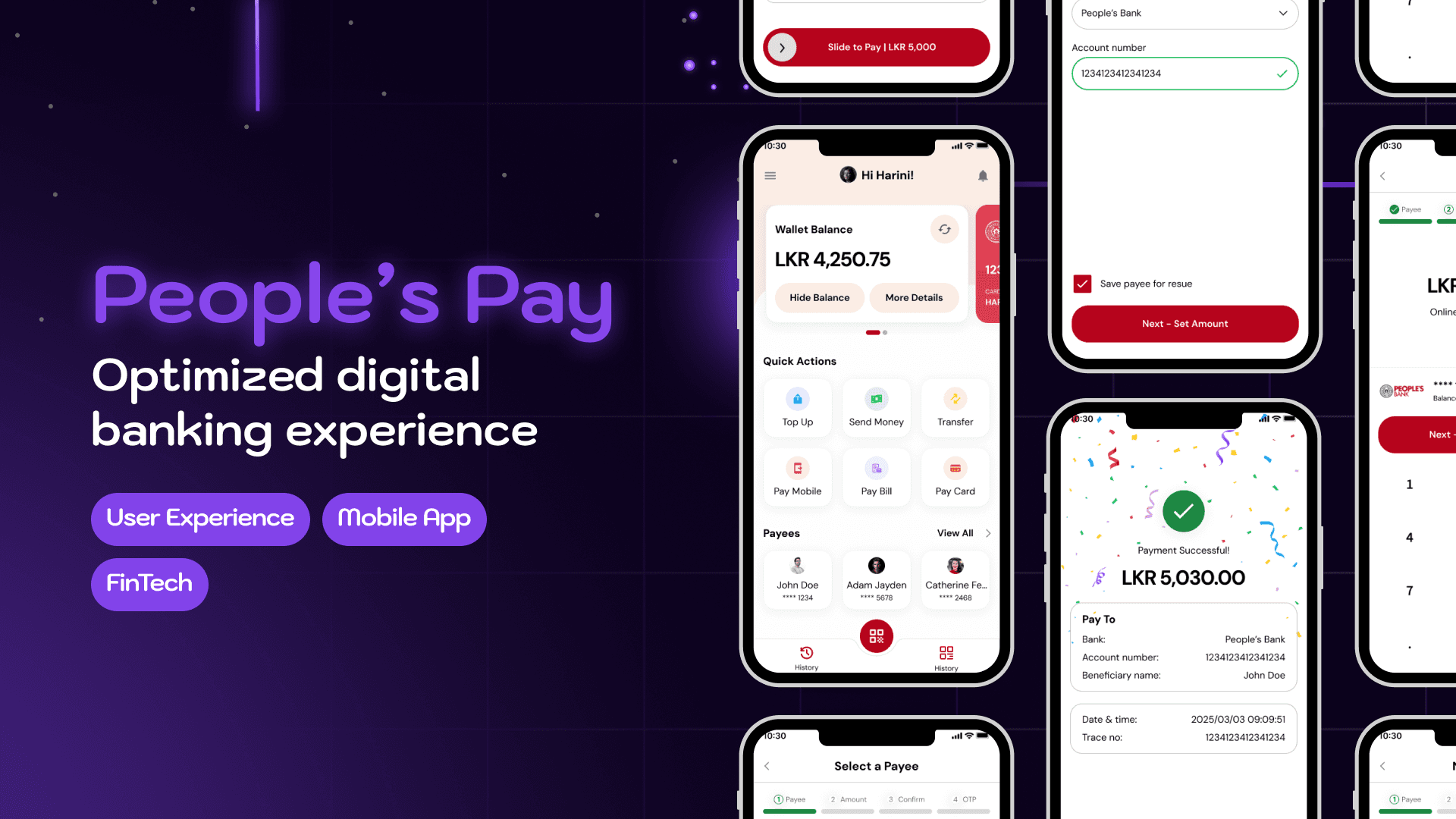
Introduction
People’s Pay is one of Sri Lanka’s leading digital banking apps by People’s Bank, offering services like bill payments, fund transfers, and account management. Despite its usefulness, the app’s homepage and fund transfer flow had several usability and privacy challenges that affected the user experience.
In this case study, I set out to improve the app’s usability, privacy, and flow efficiency — without making major visual or branding changes. I stayed within the original People’s Pay design system and focused entirely on rethinking layout and user flows. This project is a testament to how meaningful UX improvements can be made, even within strict visual constraints.
Note: This is a personal case study, and I did not collaborate with others for this project.
Problem Statement
The existing People's Pay mobile app suffers from a suboptimal user experience (UX) characterized by:
Cluttered and confusing interfaces, particularly the home screen, leading to cognitive overload for users.
Inefficient user flows that required multiple clicks and excessive navigation to complete common tasks like transferring funds, and checking account balances.
Lack of intuitive information grouping and accessibility, making it difficult for users to quickly find and utilize frequently needed features or view important account information.
User apprehension or errors in critical actions due to the absence of clear, confirming feedback mechanisms and safeguards against accidental taps.
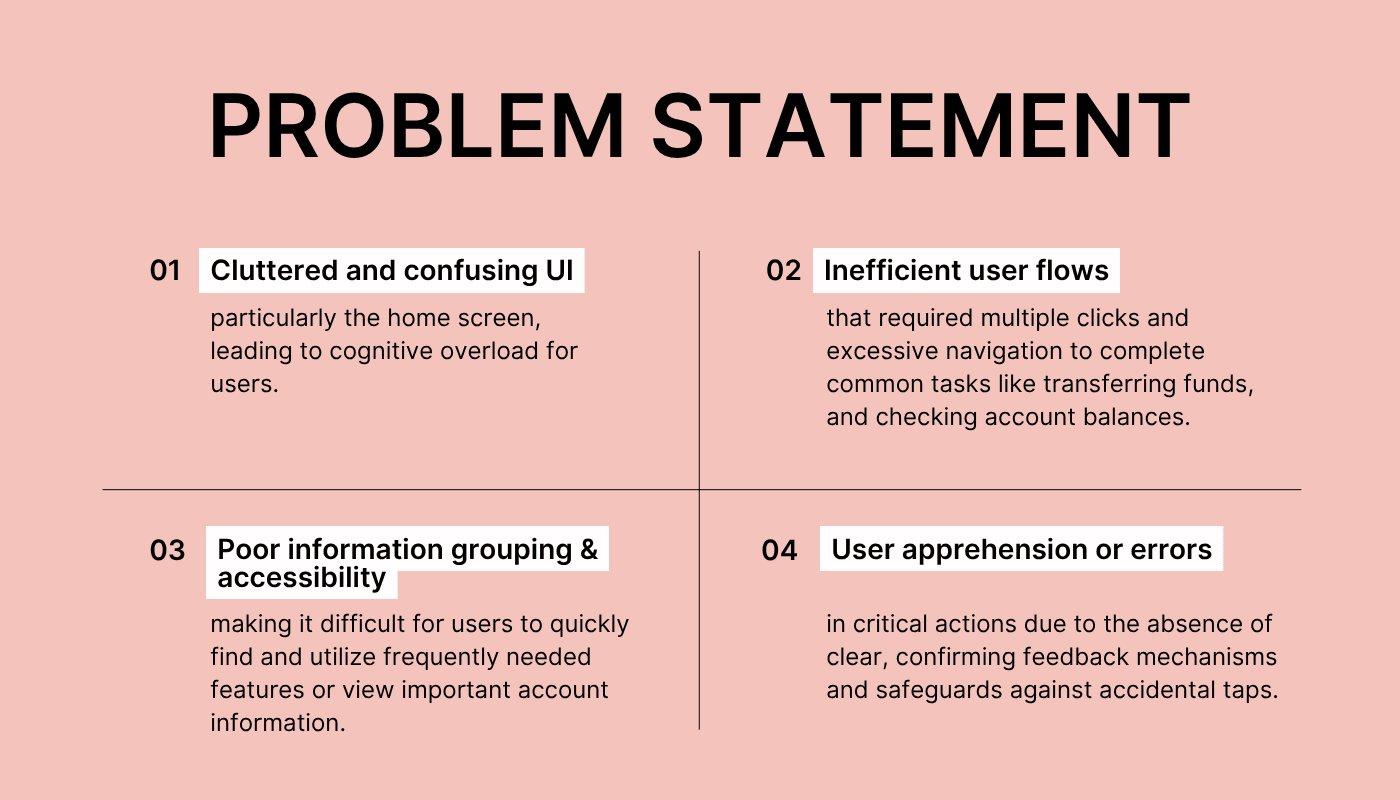
Essentially, the app, while functional, presented unnecessary friction and frustration for users in their daily financial interactions.
A Glimpse Into the Solution
The design solution for People's Pay focused on implementing subtle, strategic UX enhancements without a complete UI overhaul, aiming to:
Streamline core user flows by reducing clicks and simplifying navigation for frequent actions.
Improve information hierarchy and visual clarity to reduce cognitive load and make the app more intuitive.
Introduce confidence-building micro-interactions and feedback mechanisms to enhance user assurance and satisfaction.
Specifically, the key components of the solution included:
Redesigning the Home Screen: To reduce clutter, prioritize essential information, and provide clear pathways to key features.
Adding Favorite Actions: To provide quick access to commonly performed tasks and financial history, improving efficiency.
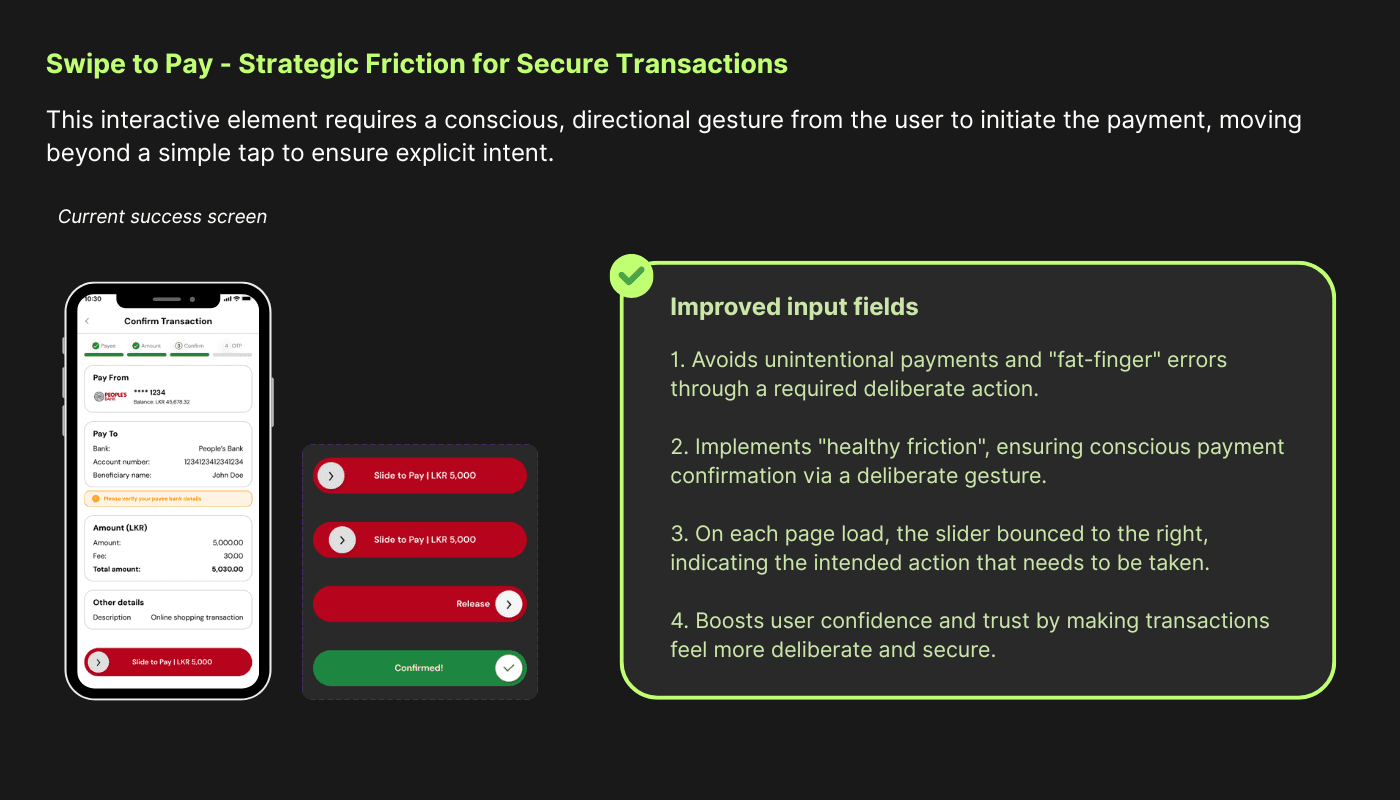
Implementing "Slide to Pay" Mechanism: To act as a deliberate action safeguard, preventing accidental taps during critical transactions and increasing user confidence.
Integrating Subtle Animations (e.g., Confetti for Success): To provide immediate, positive feedback upon successful completion of tasks, reinforcing user actions and enhancing the overall experience.
Before diving into the details, here’s a quick GIF showcasing the improved experience. Then, let’s explore the journey that led to these changes.

User Research
To understand the core challenges and opportunities for improving People's Pay, a targeted user research phase was conducted. This involved identifying the main user groups, developing a key persona, and gathering qualitative and quantitative insights into their current experiences with mobile banking and payment applications.
Main User Groups
Based on the nature of digital payment platforms and the identified pain points, the primary user groups for People's Pay include:
Everyday Users: Individuals who regularly manage personal finances, perform routine transactions like fund transfers, bill payments, and balance checks. They seek efficiency, reliability, and ease of use in their daily financial interactions.
Busy Professionals & Parents: Users with demanding schedules who prioritize quick, convenient, and secure access to financial services. They need to complete transactions swiftly without unnecessary complexity.
Users Seeking Clarity & Confidence: Individuals who might be less tech-savvy or those who desire explicit confirmation and reassurance for their financial transactions, looking for an app that minimizes anxiety and potential errors.
User Research Methods
To identify prevalent user pain points, common goals, and unmet needs, a mixed-methods approach was employed, combining direct user interaction with advanced analytical tools:
User Interviews: Qualitative insights were gathered by conducting in-depth interviews with users, to understand their current experiences, frustrations, and expectations from a digital payment application.
Usability Survey: A usability survey was administered, collecting 15 responses from a diverse group of existing and potential mobile banking app users. This provided quantitative data on common pain points and usage patterns.
AI Deep Research Tools: To augment direct user feedback and provide a broader market perspective, AI deep research tools were utilized. These tools helped in analyzing user reviews, forum discussions, and competitive app performance data to identify overarching trends, emerging user needs, and areas where People's Pay could strategically improve.
The comprehensive research aimed to deeply understand their current experiences, frustrations, and expectations from a digital payment application.
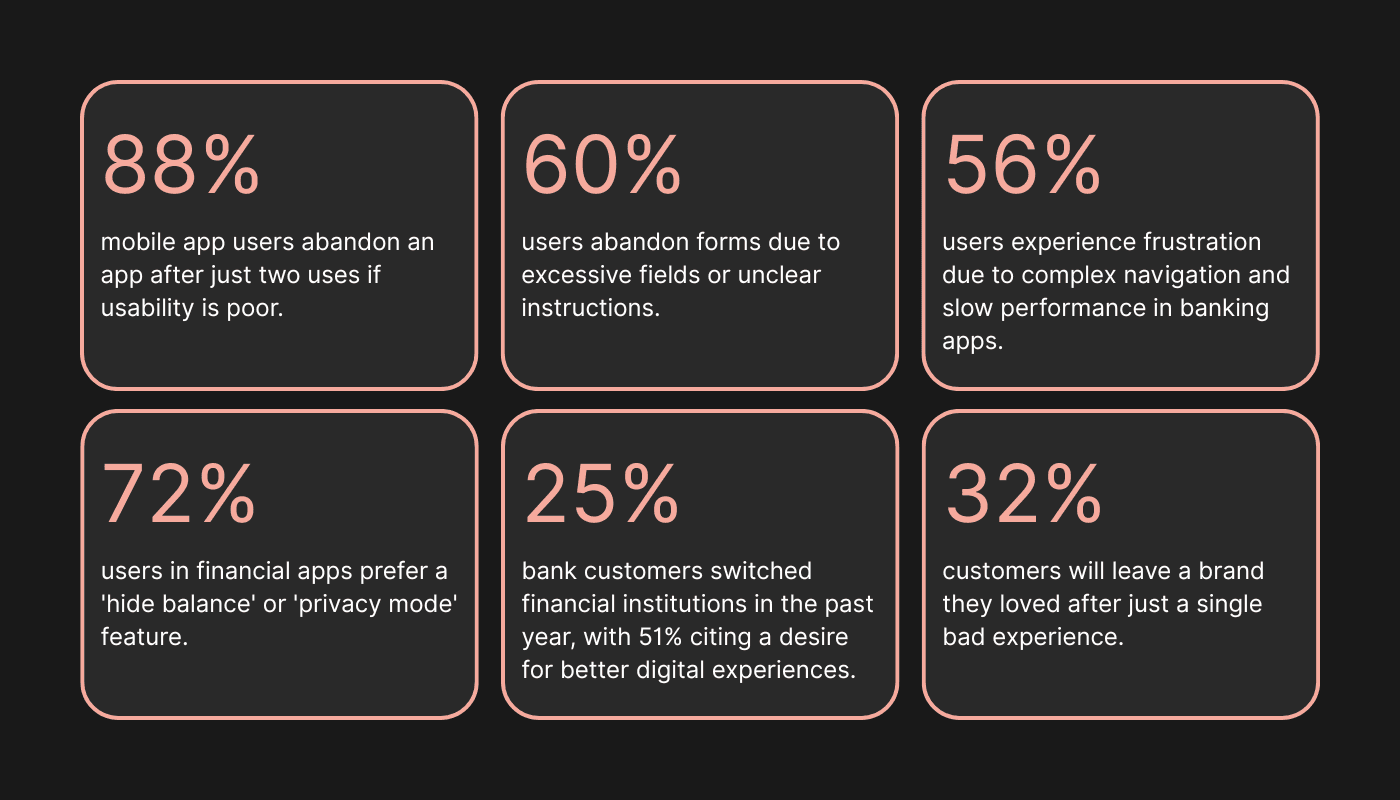
Key Findings
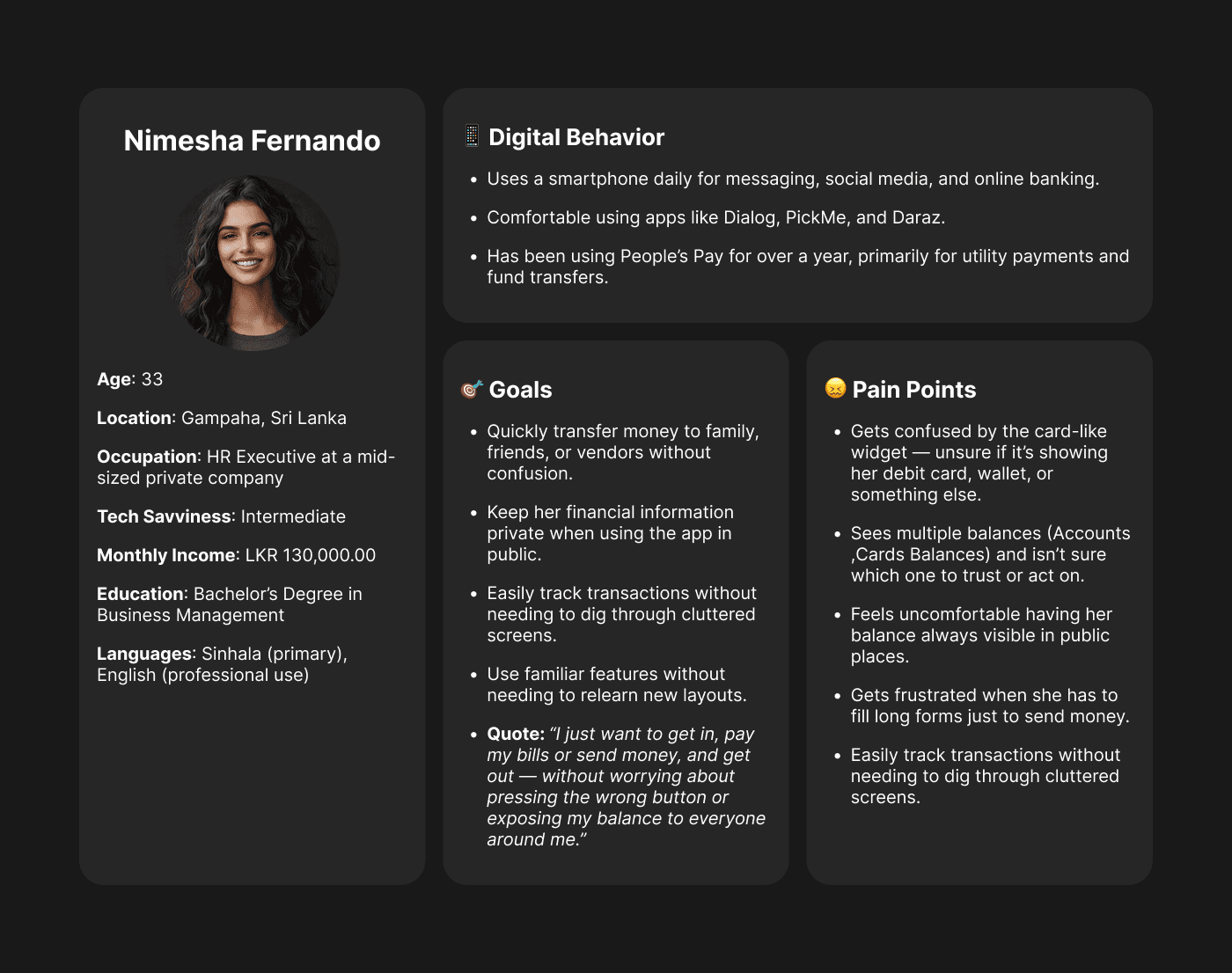
Meet Nimesha
To bring this journey to life, meet Nimesha, a 33-year-old HR Executive from Gampaha. She’s digitally fluent, but like many users, values clarity, privacy, and efficiency when handling her finances — especially during quick moments between meetings or during her commute.
Nimesha’s Journey Begins
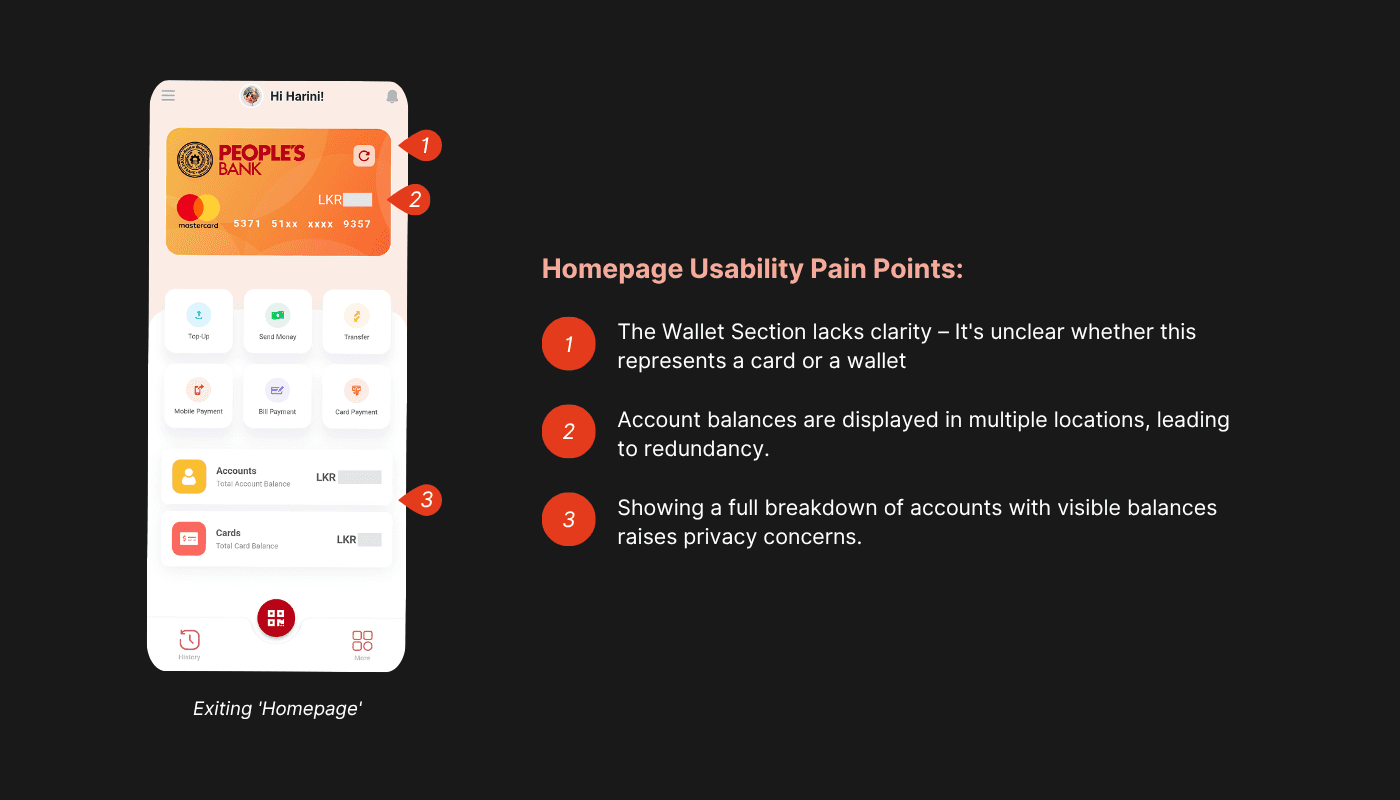
Confusion on the Homepage
It’s a Monday morning. Nimesha logs into People’s Pay to check her balance and pay her electricity bill — a routine task. But she’s immediately confused.
“What’s this card at the top? Is this my bank account or some wallet? Why are there three different balances?”
She sees a large card widget showing a number, but it’s unclear what it represents.
Below that are two conflicting sections: “Total Account Balance” and “Total Card Balance” — adding to the ambiguity.
Worst of all, her full balance is exposed, and she’s in a shared office space.
Feeling uneasy, Nimesha quickly hides her phone. What should have been a two-minute task turns into frustration.
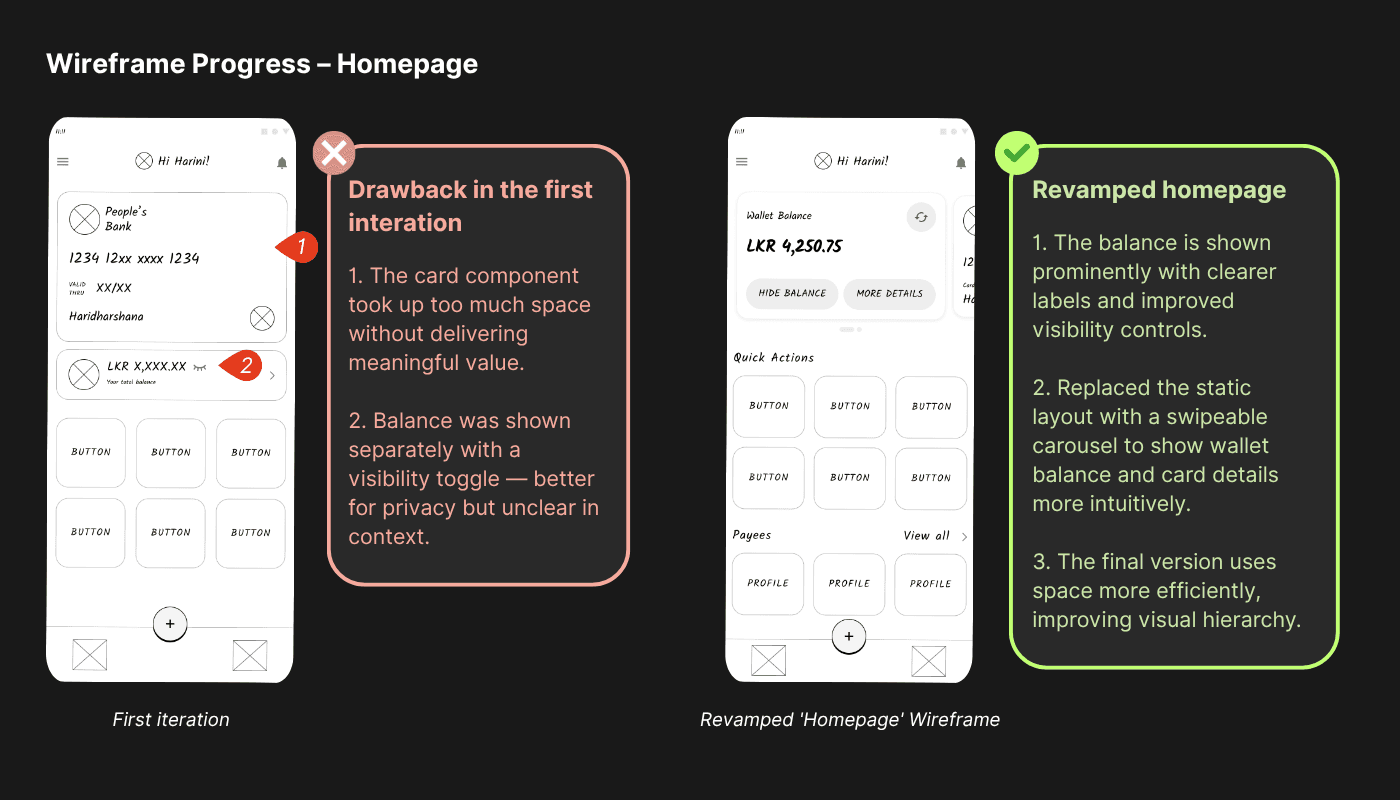
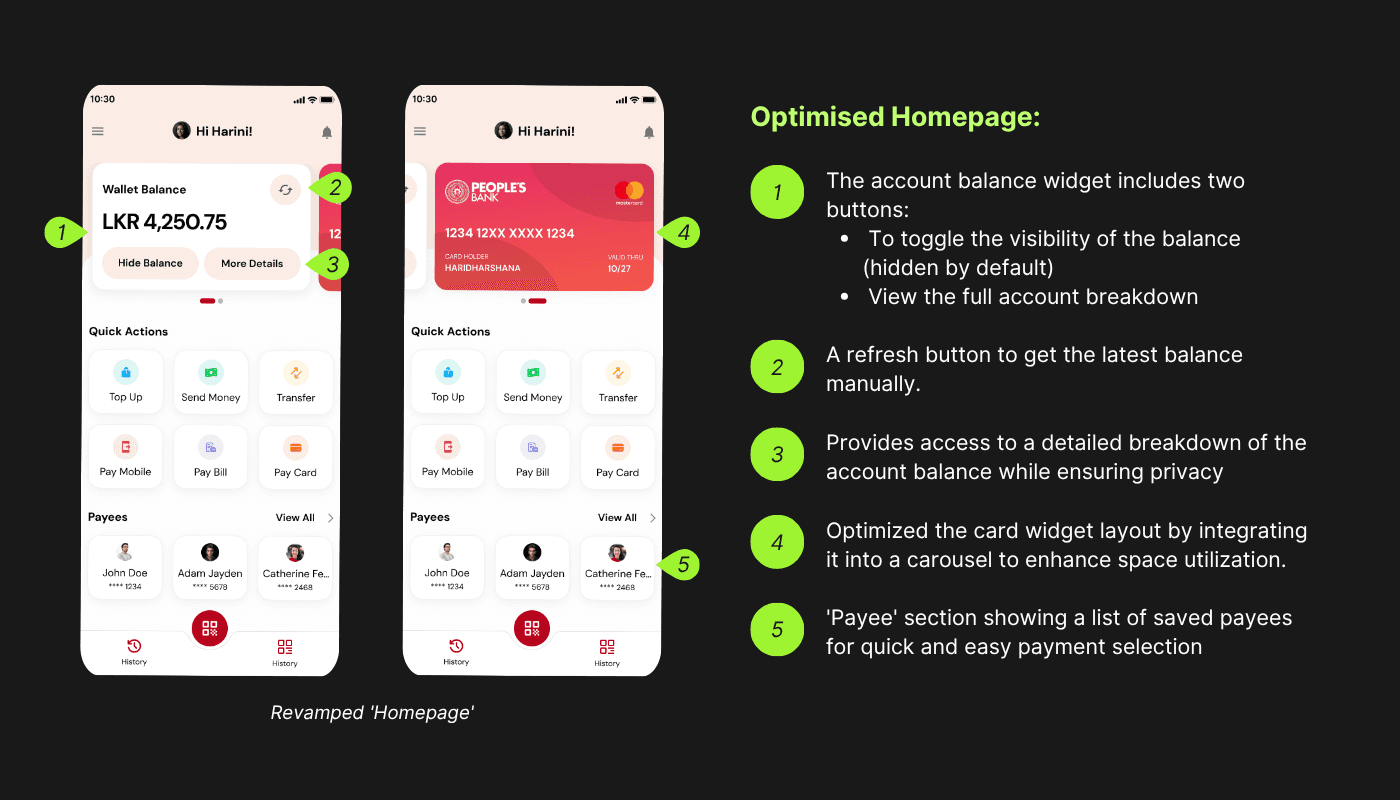
Redesigned Homepage – A Clearer Start for Nimesha
The new homepage redesign focuses on clarity and privacy:
The confusing card widget is replaced with a clearly labeled carousel, including a digital version of her People’s Bank card.
The balance widget now includes:
A Hide/Show toggle (hidden by default) to protect privacy in public.
A More Details button to access account breakdowns.
A newly added “Payees” section highlights her top three saved recipients for quick access.
“Now this makes sense — and I don’t have to worry about people seeing my balance!”
The design feels intuitive, respectful, and much easier to navigate — all while staying true to the bank’s brand.
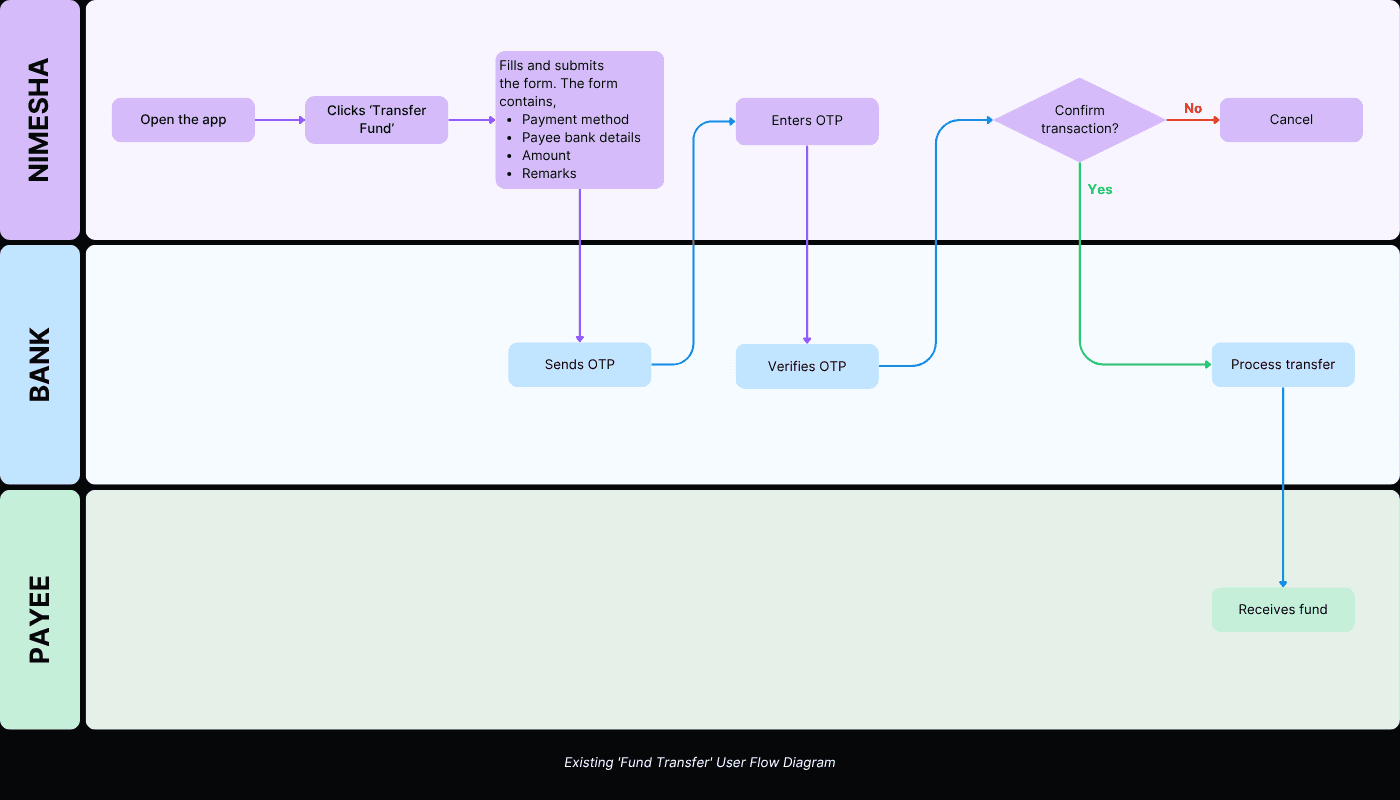
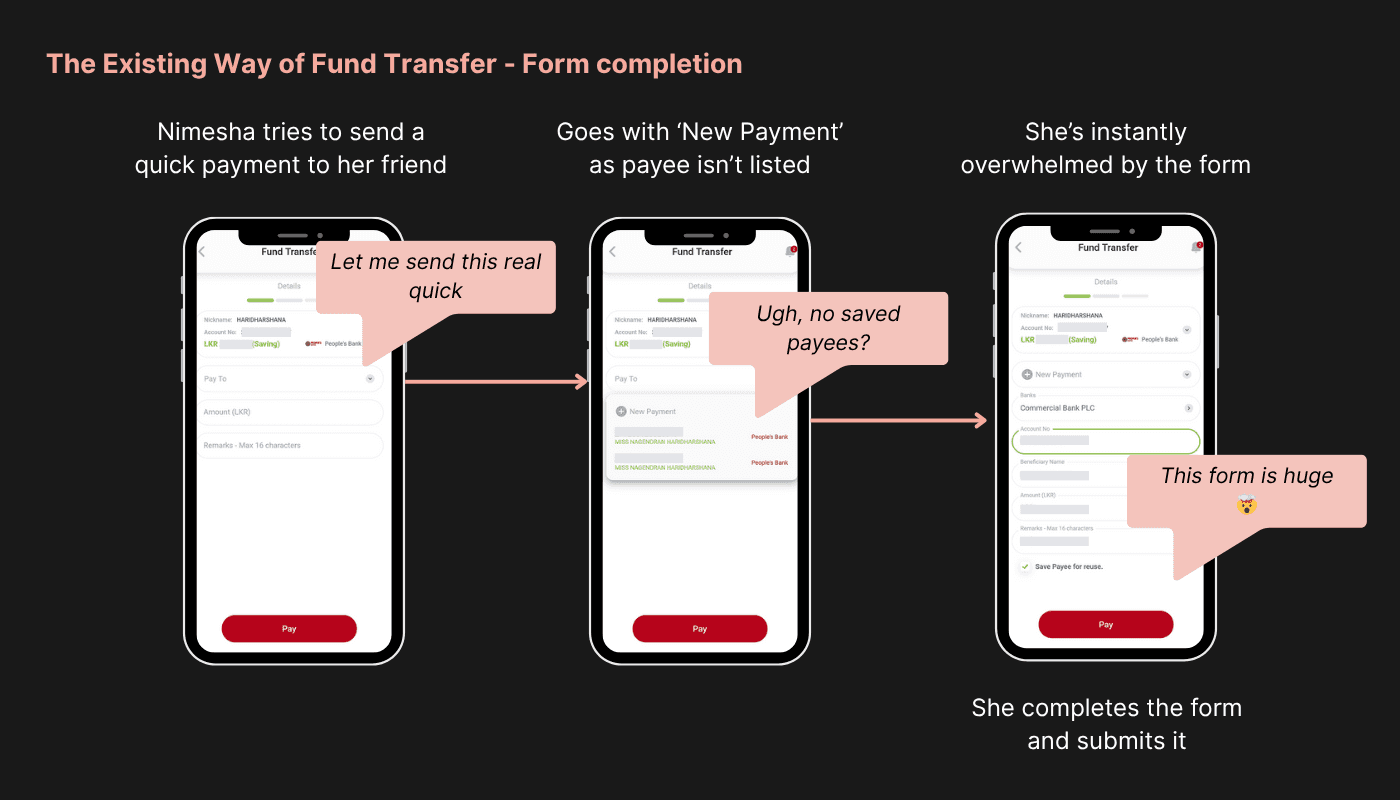
Nimesha’s Struggle to Send Money – The Existing Way
Later that day, Nimesha needs to transfer money to a friend. She opens the app and taps ‘Transfer Fund’, hoping it’ll be a quick task.
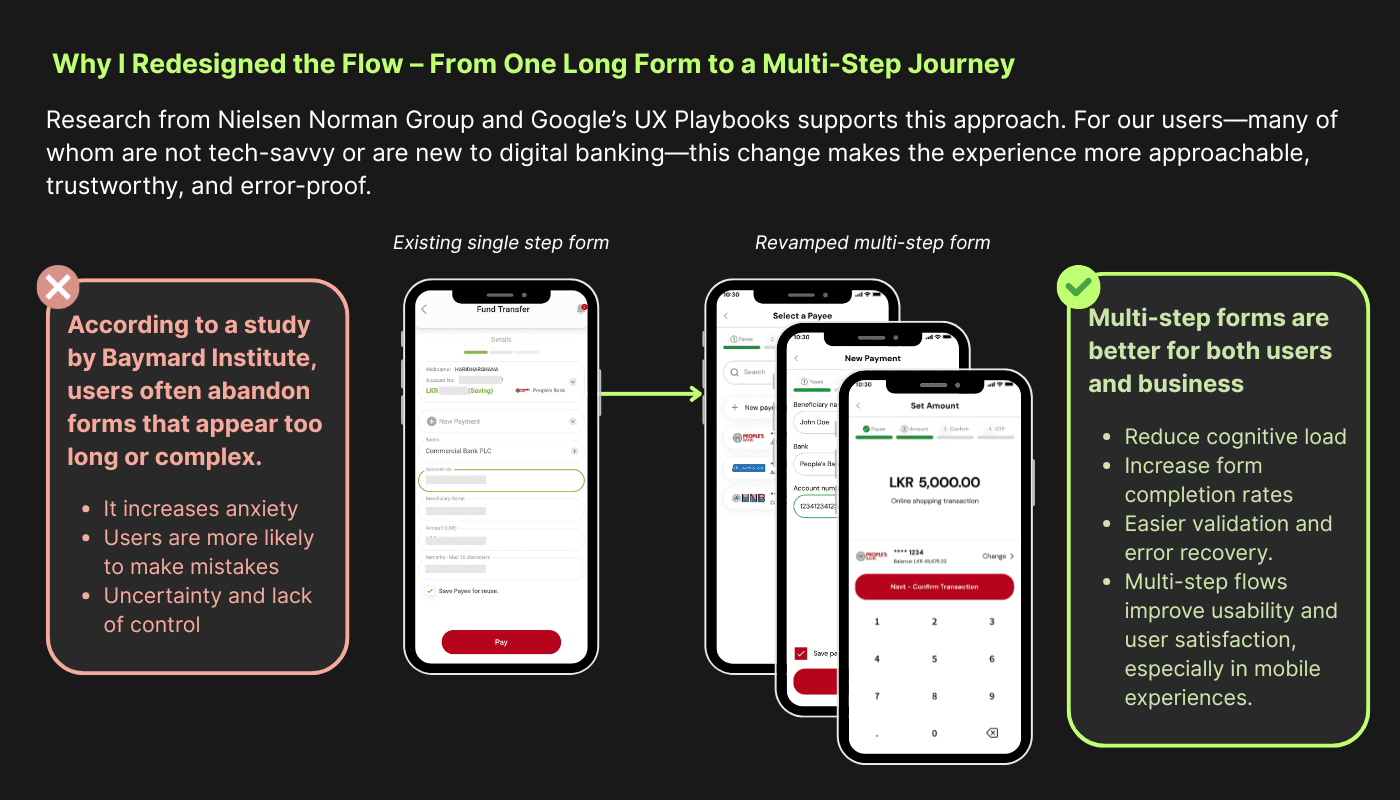
But instead, she’s met with a long and overwhelming form.
“Wait, I have to fill all of this in one go? Bank, account number, beneficiary name, amount... and what’s this ‘remarks’ thing limited to 16 characters?”
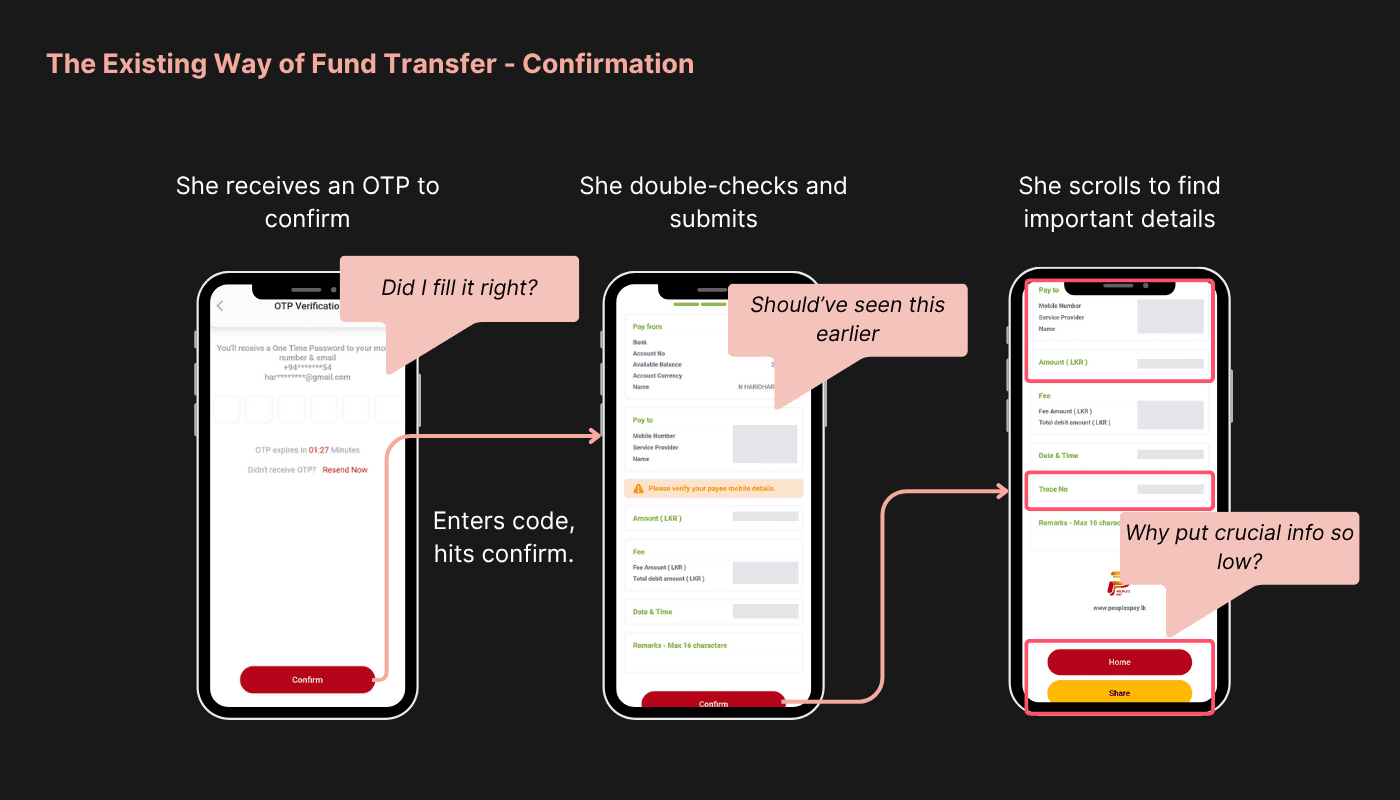
She carefully fills out the long form, double-checking every detail — from the bank name to the account number. When she receives the OTP, she enters it and waits for the confirmation screen to appear.
That’s when her heart sinks.
“Oh no… the account number is wrong.”
Only now does she notice the mistake, but it’s too late — there’s no option to go back and edit just that one field.
She has to start the entire process from scratch.
“All that effort… just to do it all over again?”
After a frustrating repeat, the transaction finally goes through. But now the confirmation screen feels just as clunky:
Important details like the Trace No. are hidden below the fold.
The ‘Share Receipt’ button is buried and hard to find.
What should’ve taken a minute ends up wasting ten.
Redesigned Fund Transfer Flow – Simplified for Humans
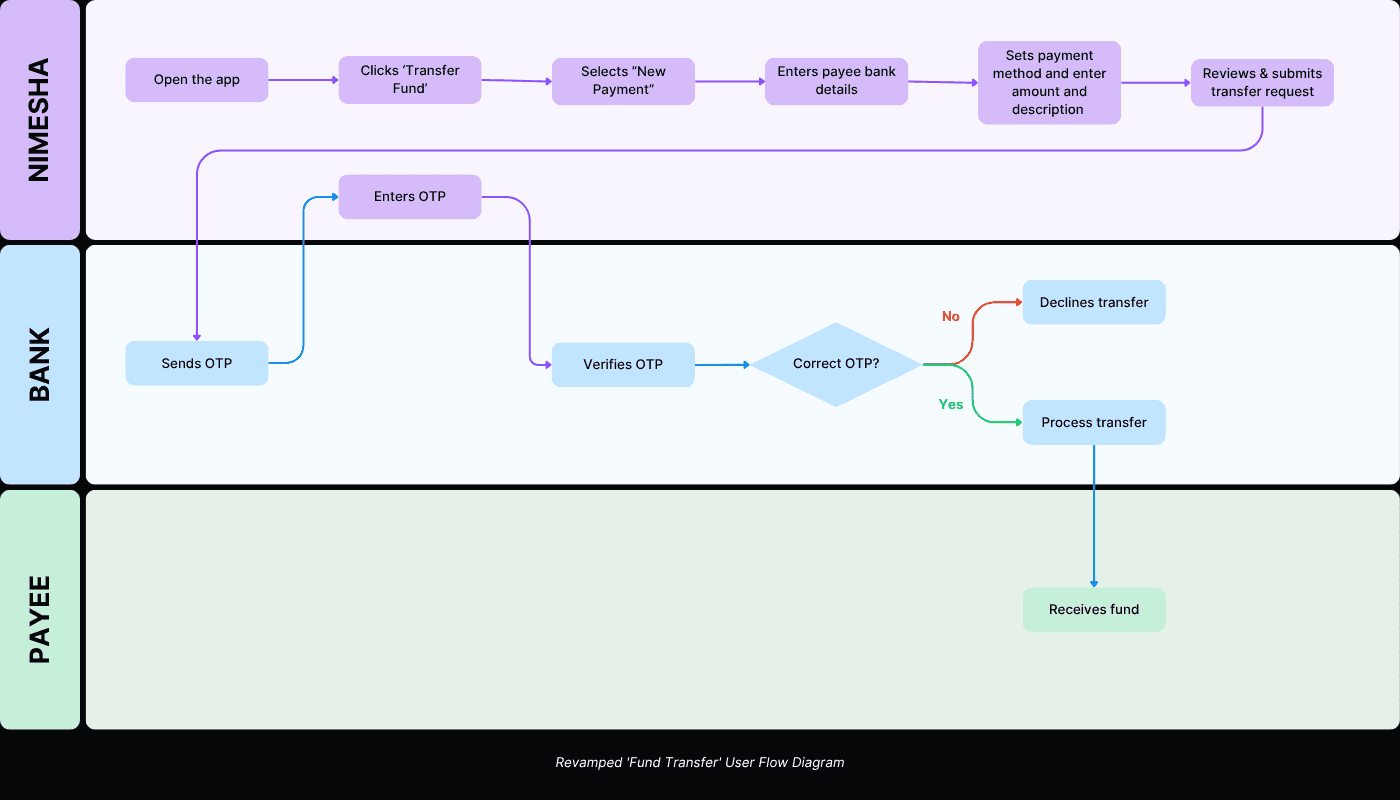
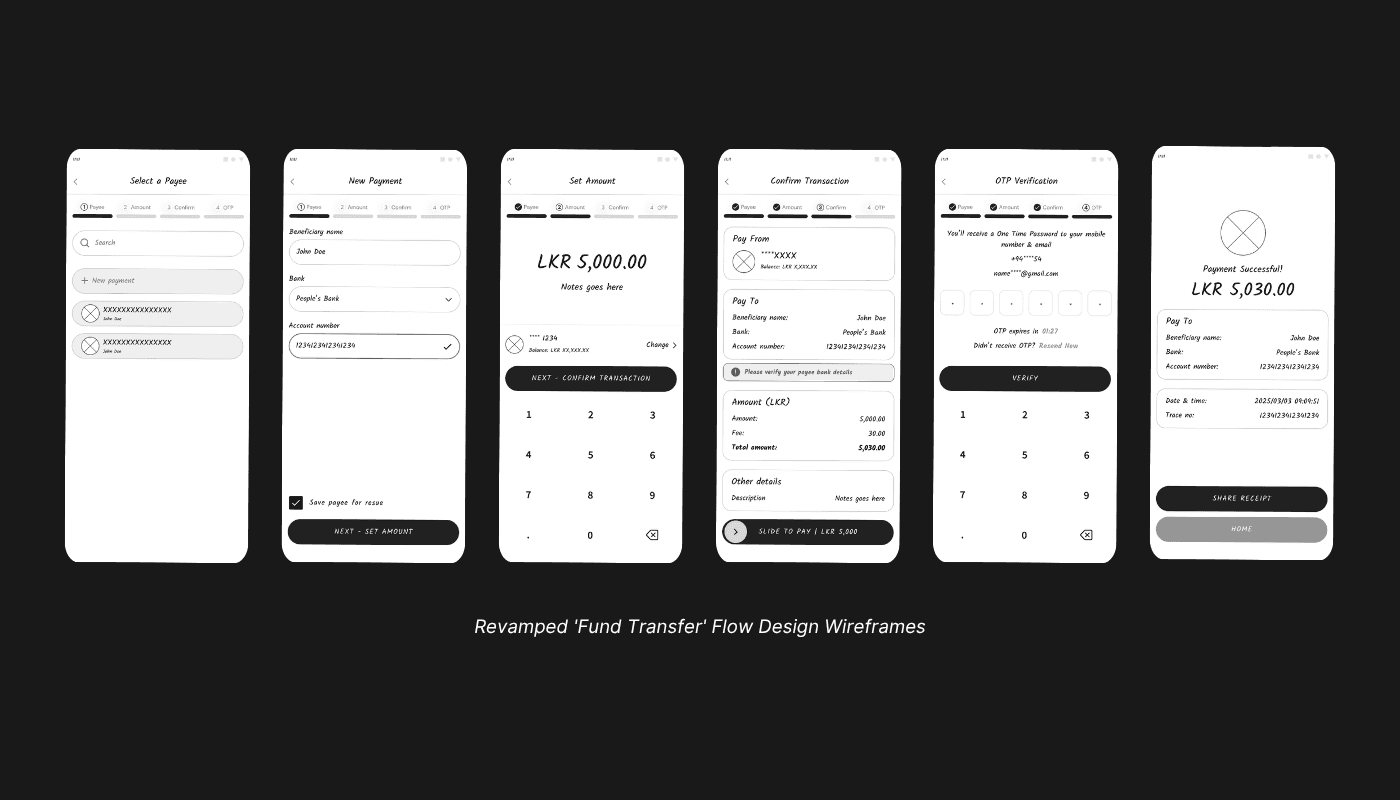
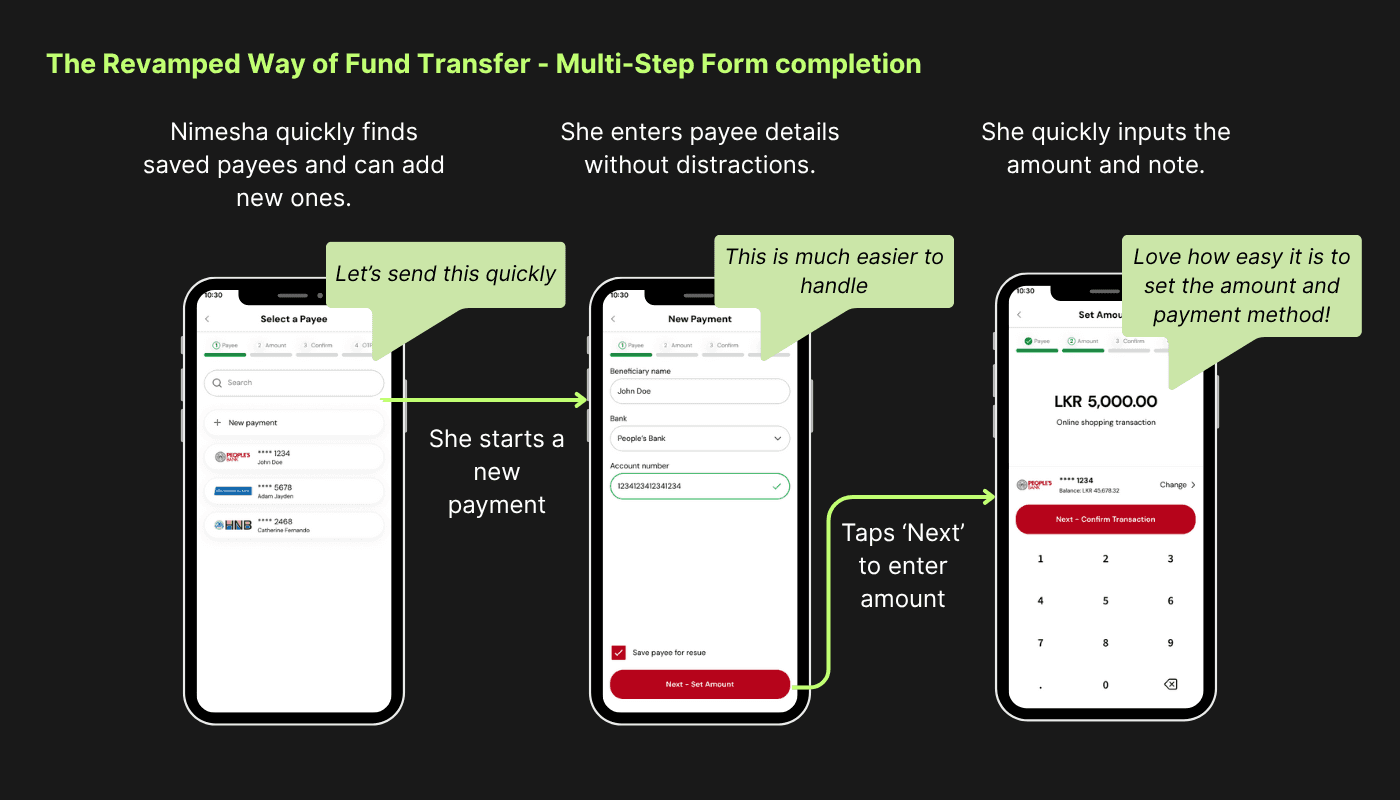
The new flow breaks the complex form into easy, digestible steps:
Nimesha taps Transfer Fund → New Payment
Step 1: Add payee bank details
Step 2: Enter amount, description & select payment method
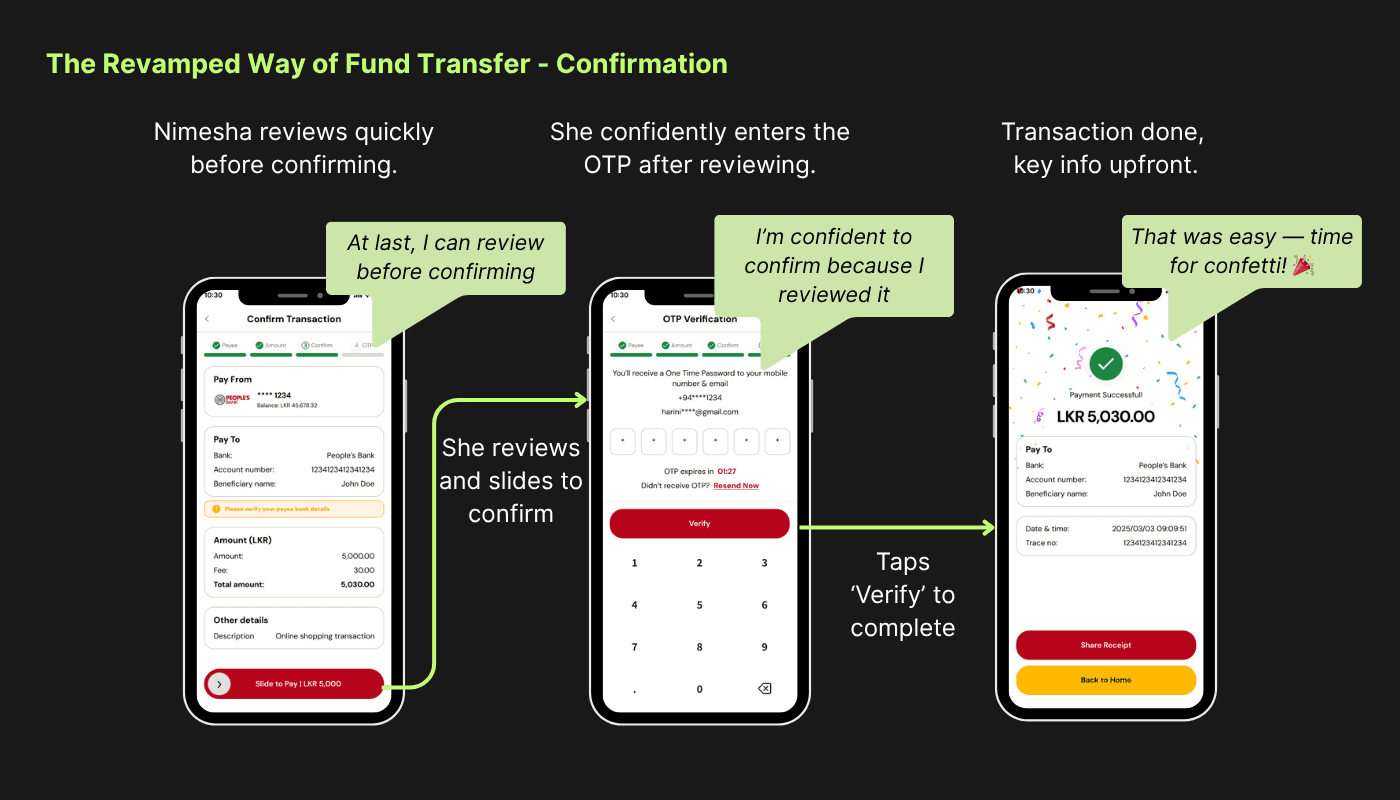
Step 3: Review all details
Bank sends OTP
Enter OTP
OTP is verified
Bank processes the payment
Funds delivered to payee
“Finally! I can review everything before the OTP. This feels safe and smooth.”
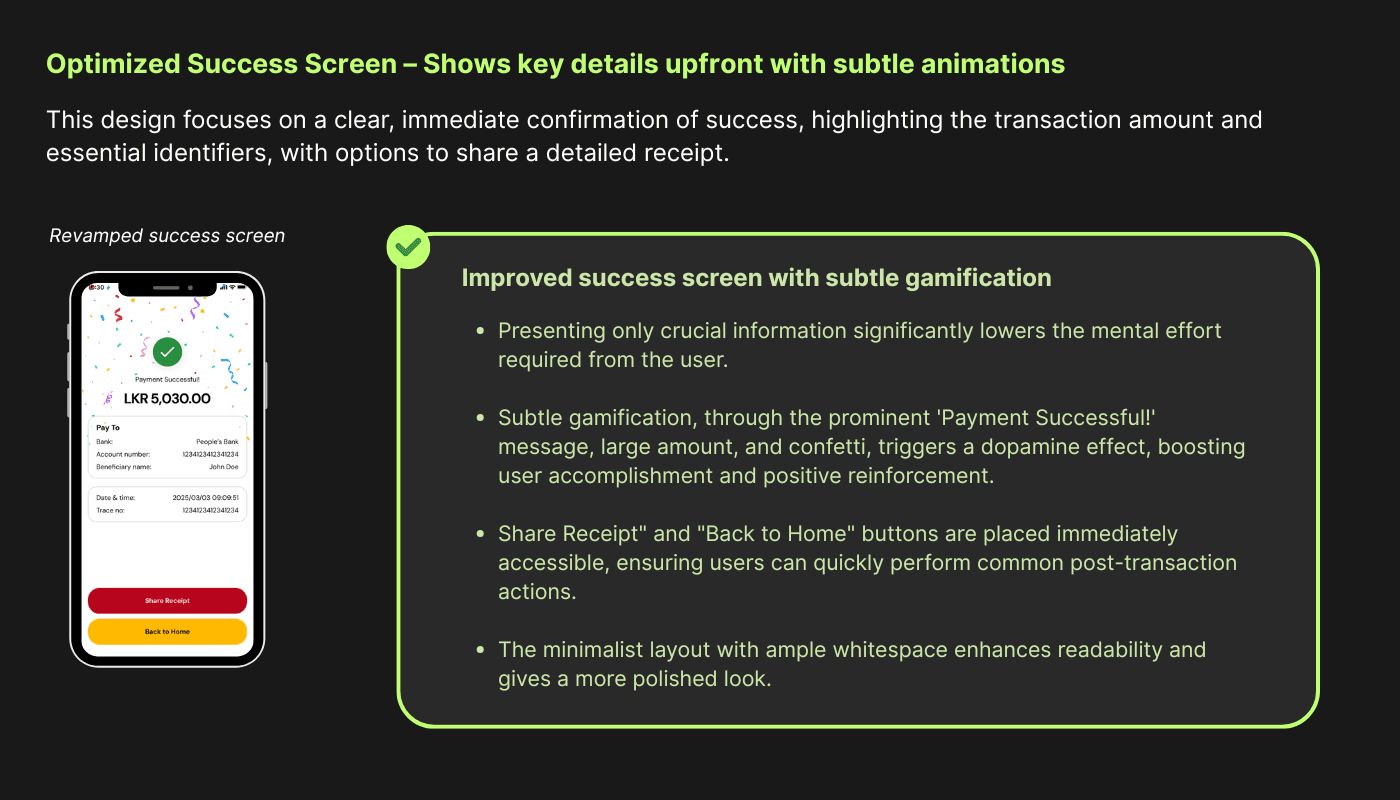
Post-payment, a subtle animation celebrates the success, and a clean summary screen displays the Trace No. and Share Receipt option immediately — no scrolling required.
Whether she’s paying someone new or a saved payee, the experience remains consistent and efficient.
Key Improvements
✅ Step-by-Step Flow – Breaks down cognitive load and adds clarity
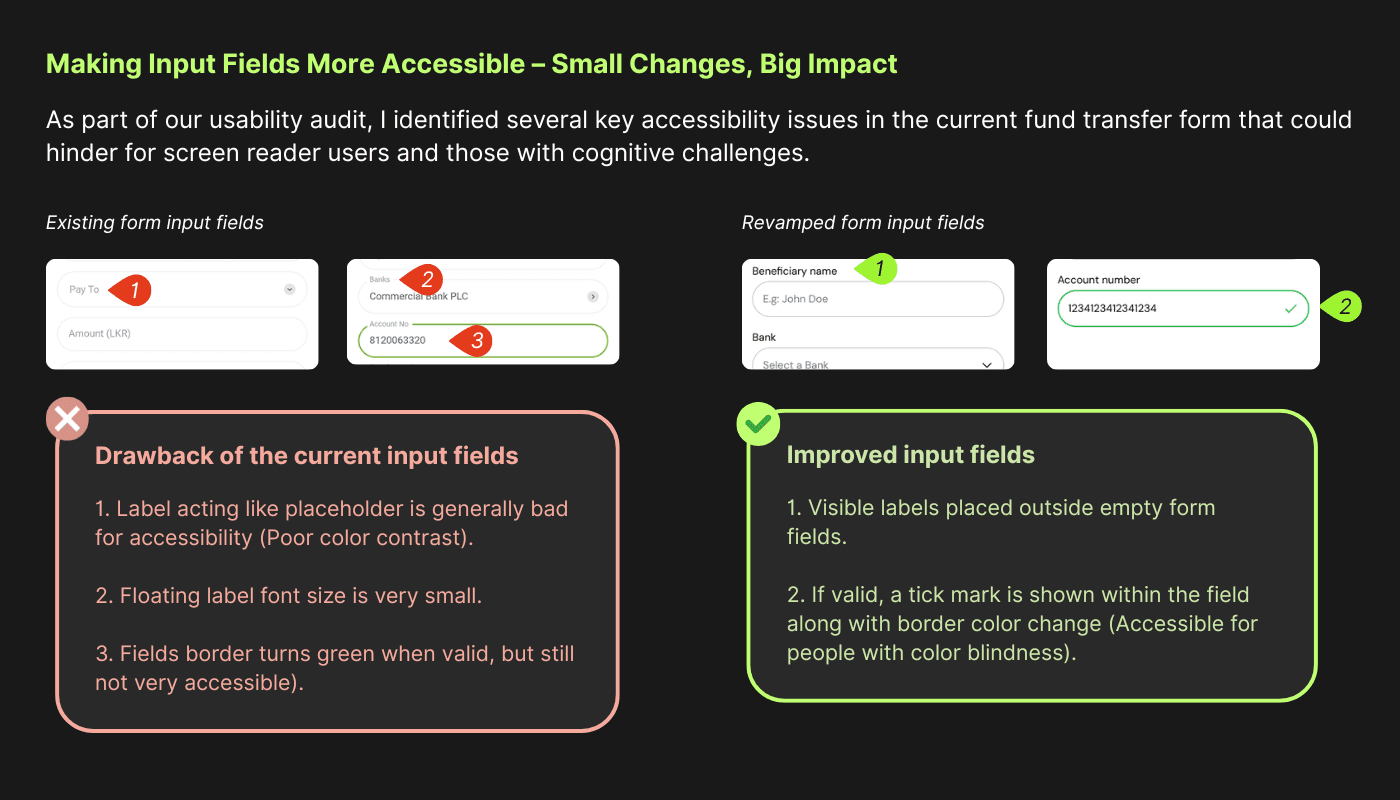
✅ Accessible Validations – Tick mark added alongside color changes for inclusivity
✅ Clear Progress Bar – Keeps users oriented
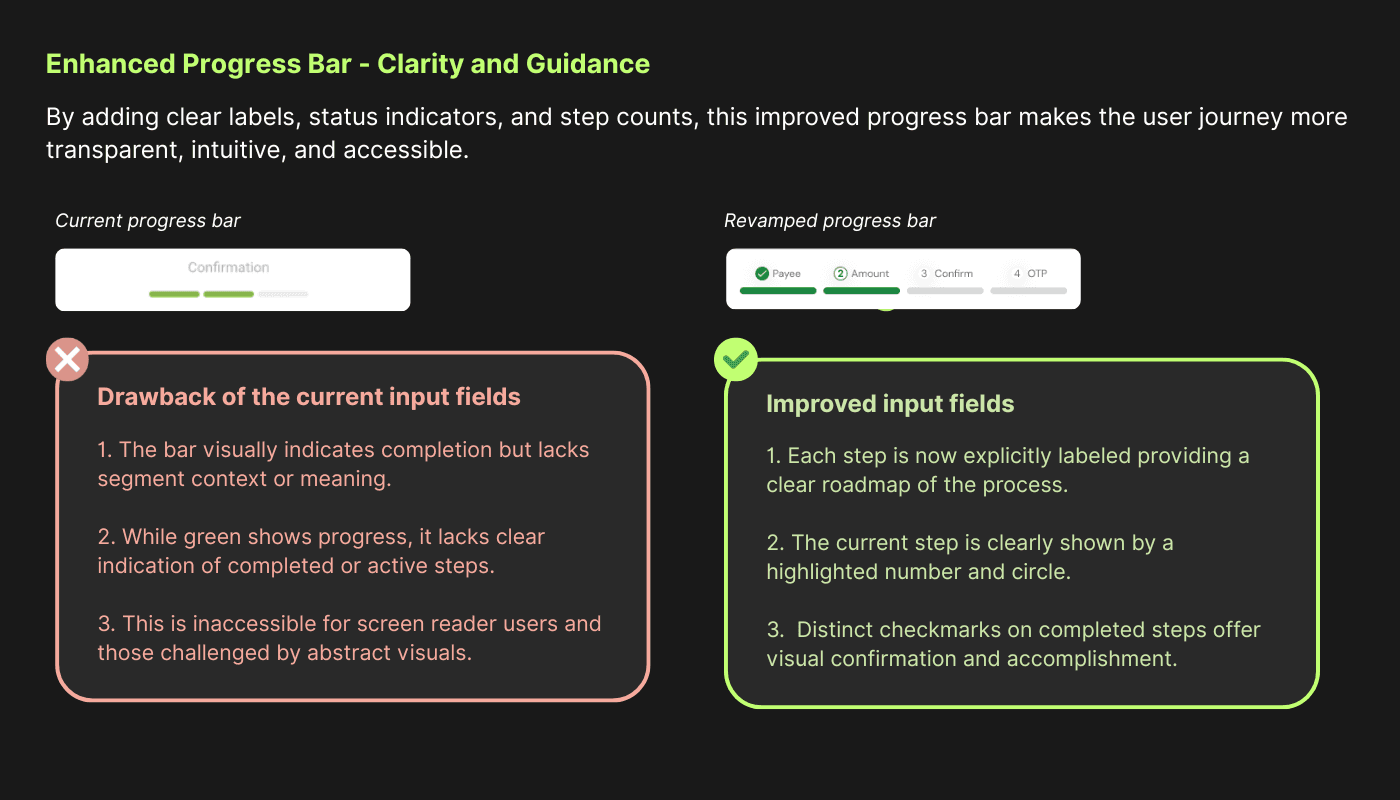
✅ Swipe to Pay button - Avoid accidental clicks
✅ Optimized Success Screen – Shows key details upfront with subtle animations
The Design Thinking Behind It All
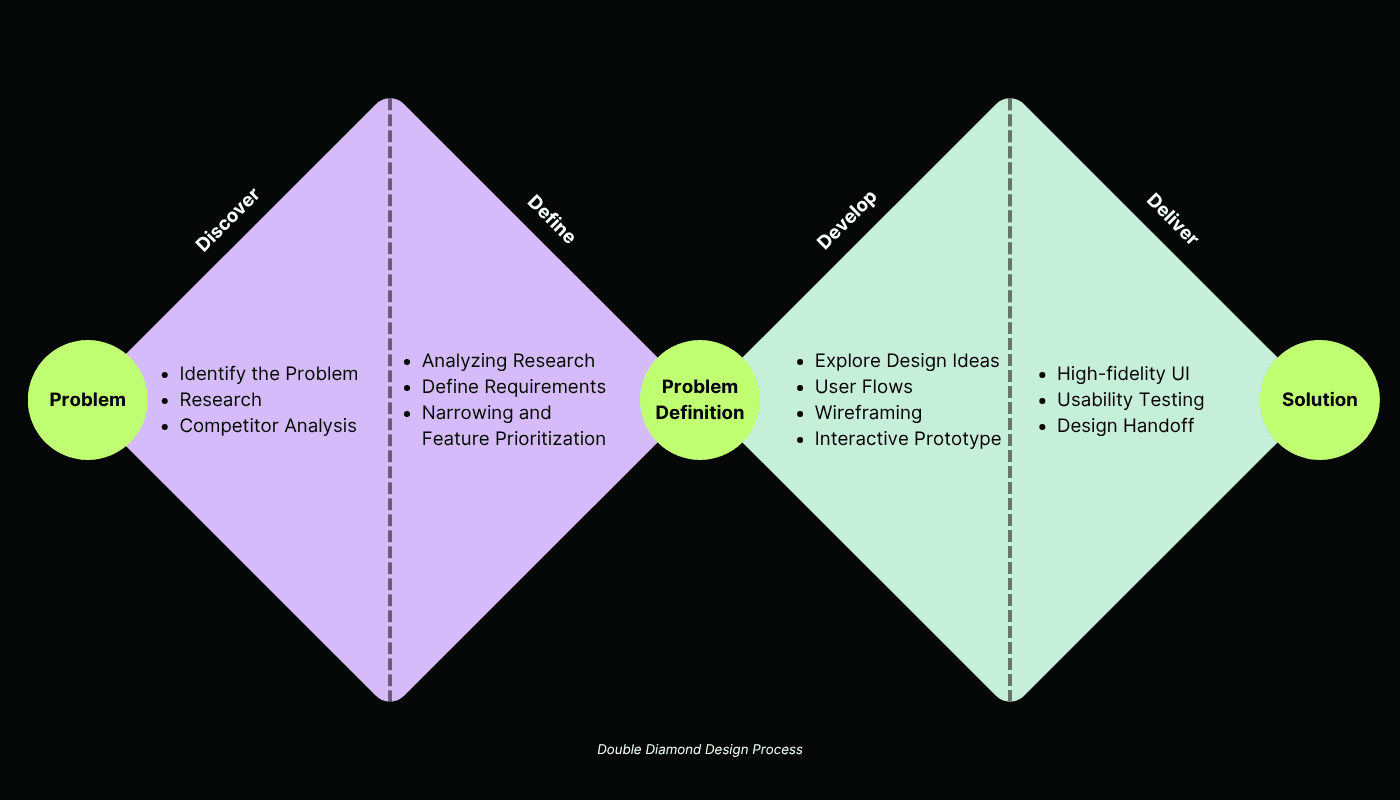
I used the Double Diamond approach:
🔍 Discover
Heuristic analysis of the original app
Studied patterns in leading digital banking apps
🧭 Define
Identified homepage confusion and transfer form fatigue as high-friction pain points
✏️ Develop
Sketched wireframes
Prototyped flows and iterated based on clarity and emotional flow
🚀 Deliver
High-fidelity UI with privacy-first, step-based flows, and accessible feedback
Tools & Technologies Used
Figma – For UI design, wireframing, prototyping
FigJam – For journey mapping and brainstorming sessions
Outcomes & Takeaways
If implemented, these changes could lead to:
✅ Higher engagement – Users feel more confident and in control
✅ Fewer errors – Catch mistakes before OTP submission
✅ Improved privacy – Hidden balances = peace of mind
✅ Greater retention – Smoother experience builds loyalty
✅ Lower support costs – Clearer flows reduce transaction issues
✅ Stronger brand image – Thoughtful UX signals innovation
Key UX Lessons
🗝️ Clarity Over Complexity – Users like Nimesha need context, not clutter
🗝️ Progressive Disclosure Works – Show only what’s needed at each step
🗝️ Privacy is UX, too – Especially in shared spaces
🗝️ Delight Matters – Small animations leave lasting impressions
🗝️ Accessibility = Inclusivity – Color + symbols guide more people better
Conclusion
Nimesha’s story is not unique — it reflects the everyday frustrations of many digital banking users. By focusing on clarity, consistency, and care, I transformed a clunky experience into one that feels modern, safe, and easy — all without touching the visual brand.
The result? A smoother day for Nimesha — and a better product for the bank.